


GPS Historical Track
1.POST Address
http://ip:port/EHCommon/history/gpsHistory/getCardHistory
2.Parameter Description
| Field | Required or not | Type | Description |
| begin | √ | Number | Query Start Time |
| end | Number | Query End Time | |
| uuid | Number | Unique Object ID; At least one of the parameters (uuid, card_id_list, area_id_list|area_xy) is required. | |
| card_id_list | Number[] | Card Number List; At least one of the parameters (uuid, card_id_list, area_id_list|area_xy) is required. | |
| area_id_list | Number[] | Area ID List; area_id_list and area_xy cannot be passed simultaneously. At least one of the parameters (uuid, card_id_list, area_id_list|area_xy) is required. | |
| area_xy | Number[] | Temporary Area Coordinates; area_id_list and area_xy cannot be passed simultaneously. At least one of the parameters (uuid, card_id_list, area_id_list|area_xy) is required. |
3.Success 200
| Field | Type | Description |
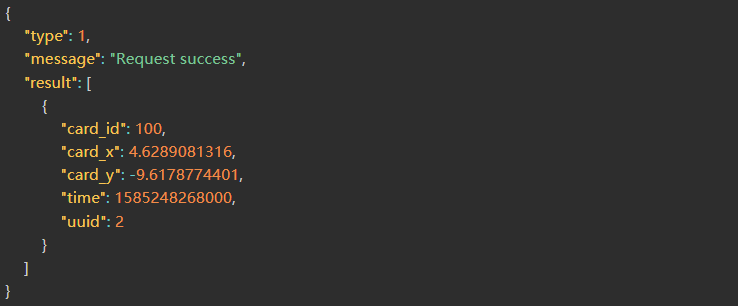
| result | Object[] | Result Set |
| id | Number | Auto-increment ID |
| card_id | Number | Card Number |
| uuid | Number | Unique ID |
| card_x | Float | X Coordinate |
| card_y | Float | Y Coordinate |
| time | Number | Timestamp |
Correct Return Example
Mine Access
1.POST Address
http://ip:port/EHCommon/pit/PitRecord/getPitRecordPressureHistory
2.Parameter Description
| Field | Required or not | Type | Description |
| scene_id | √ | Number | Scene ID |
| type_id | √ | Number | ID Type: 1-Scene, 2-Entrance Overlimit, 3-Entrance Staff Shortage |
| begin | √ | Number | Start Timestamp (Default time interval: 3 hours) |
| end | √ | Number | End Timestamp |
3.Success 200
| Field | Type | Description |
| message | String | Interface Request Message |
| type | Number | Interface Request Status |
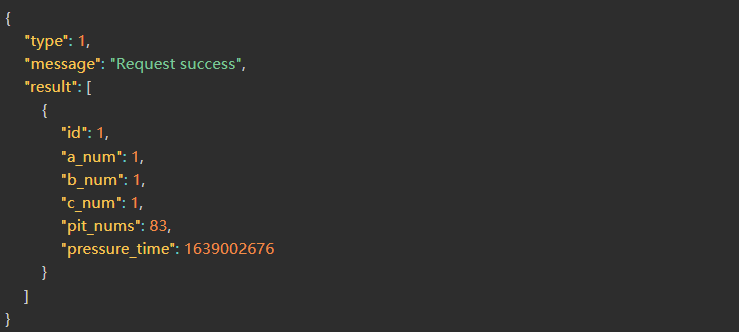
| result | Object[] | Historical Well Access Statistics List |
| id | Number | Primary Key ID |
| a_num | Number | Limit Number A (0 means none) |
| b_num | Number | Limit Number B (0 means none) |
| c_num | Number | Limit Number C (0 means none) |
| pit_nums | Number | Personnel Count |
| pressure_time | Number | Update Timestamp |
Correct Return Example
1.POST Address
http://ip:port/EHCommon/pit/PitRecord/multiDetail
2.Parameter Description
| Field | Required or not | Type | Description |
| utype | √ | Number[] | Card Type: 1-Employee, 2-Vehicle, 3-Visitor, 5-Material, 6-Contractor |
| rule_type_id | √ | Number | Scene Type: 1-Entrance Overstaffing, 2-Staff Shortage |
| card_type_name | String | Card Type Name | |
| order | √ | String | Sort Order |
| field | √ | String | Sort fields only support: in_pit_time, pit_stay_time |
| scene_id | √ | Number | Scene ID |
| personnel_id | Number | Personnel Classification | |
| branch_id | Number | Department ID | |
| duty_id | Number | Post ID | |
| work_type_id | Number | Type of Work ID Vehicle information related filter conditions | |
| type_id | Number | Vehicle Type ID | |
| company | String | Visitor Company | |
| page | Number | ||
| limit | Number |
3.Success 200
| Field | Type | Description |
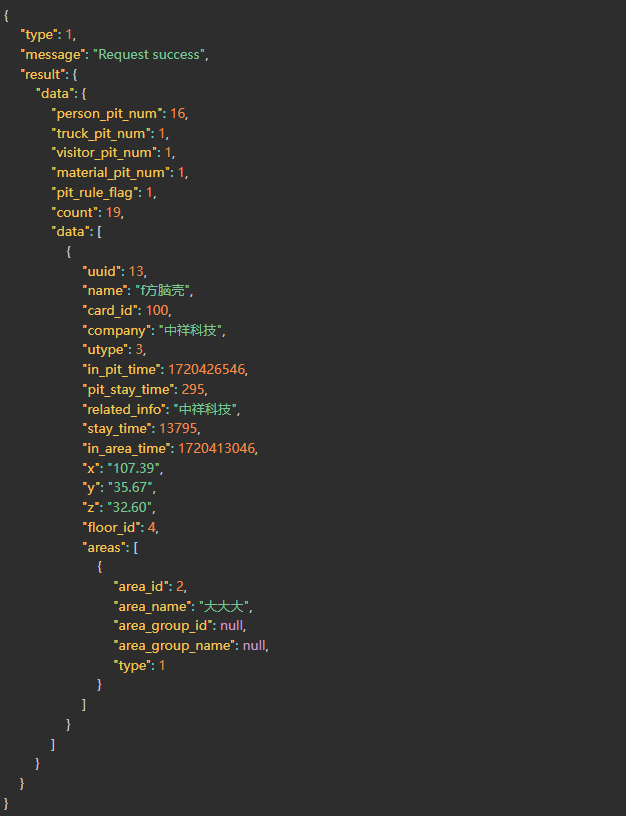
| result | Object | Result Set |
| count | Number | Total Count |
| data | Object[] | Data(Returned exclusively for materials) |
| card_id | Number | Card Number |
| serial_num | String | Material No. |
| name | String | Material Name |
| type_id | Number | Material Type ID |
| type_name | String | Material Type |
| company | String | Company(Returned exclusively for visitors) |
| licence | String | Returned exclusively for vehicles |
| driver | String | Driver/Contractor Exclusive Return |
| unit_name | Number | Contractor Company Name |
| unit_type_name | String | Contractor Company Type Name |
| branch_id | Number | Department ID |
| branch_name | String | Department |
| job_num | String | Employee ID (Common Fields) |
| uuid | Number | uuid |
| areas | Object[] | Current Area |
| area_id | Number | Area ID |
| area_name | Number | Area Name |
| group_id | Number | Area Group ID |
| group_name | Number | Area Group Name |
| in_area_time | String | Area Entry Time |
| stay_time | Number | Residence Duration (Unit: Second) |
| x | Number | Tag X Coordinate |
| y | Number | Tag Y Coordinate |
| z | Number | Tag Z Coordinate |
| floor_id | Number | Floor ID |
| in_pit_time | Number | Pit Entry Time |
| pit_stay_time | Number | Pit Residence Duration |
Correct Return Example
Underground entry and exit area
1.POST Address
http://ip:port/EHCommon/pit/pitArea/addPitArea
2.Parameter Description
| Field | Required or not | Type | Description |
| area_name | √ | String | Area Name |
| area | √ | String | Area Coordinates |
| area_template_id | √ | Number | Area Template Name |
| floor_id | √ | Number | Floor ID |
| type | √ | Number | Area Type [9 First Area, 10 Second Area] |
| shape | √ | Number | Shape, 1 Non-circular, 2 Circular, Default Non-circular |
| circle_attribute | √ | String | Circular Attribute JSON String {“radius”:1,”center”:{“x”:1,”y”:2]} Default Empty |
3.Success 200
| Field | Type | Description |
| message | String | Interface Request Message |
| type | Number | Interface Request Status |
| result | String | Successfully added upper and lower well areas |
Correct Return Example

1.POST Address
http://ip:port/EHCommon/pit/pitArea/checkAreaName
2.Parameter Description
| Field | Required or not | Type | Description |
| name | √ | String | Region Name |
| id | String | Region ID |
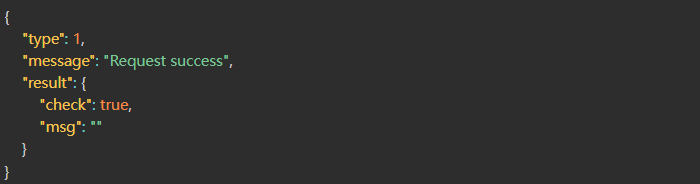
3.Success 200
| Field | Type | Description |
| message | String | API Request Message |
| type | Number | API Request Status |
| result | Object | Request Result |
| check | Boolean | If true, the test was successful; if false, the test failed. |
| msg | String | Reason for Test Failure |
Correct Return Example
1.POST Address
http://ip:port/EHCommon/pit/pitArea/deletePitArea
2.Parameter Description
| Field | Required or not | Type | Description |
| area_id | √ | Number | Well Access Area ID |
3.Success 200
| Field | Type | Description |
| message | String | Interface Request Message |
| type | Number | Interface Request Status |
| result | String | Successfully deleted upper and lower well areas |
Correct Return Example

1.POST Address
http://ip:port/EHCommon/pit/pitArea/getPitArea
2.Parameter Description
| Field | Required or not | Type | Description |
| floor_id | Number | Floor ID | |
| area_name | String | Area Name |
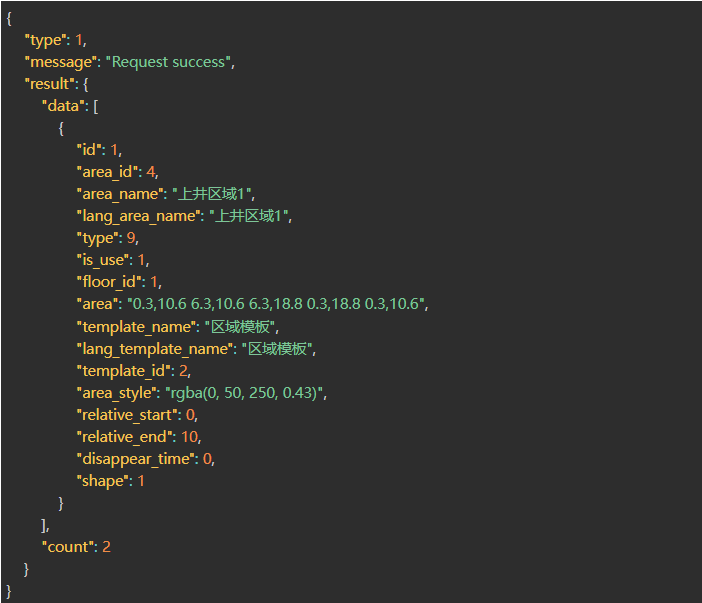
3.Success 200
| Field | Type | Description |
| message | String | Interface Request Message |
| type | Number | Interface Request Status |
| result | Object | Return Result |
| data | Object[] | Area List |
| area_id | Number | Well Access Area ID |
| area_name | String | Well Access Area Name |
| type | Number | Well Access Area Category [9-First Area, 10-Second Area] |
| is_use | Number | Enable Status [0-Disabled, 1-Enabled] |
| floor_id | Number | Floor ID |
| area | String | Area Coordinates |
| template_name | String | rea Template Name |
| template_id | Number | Area Template ID |
| area_style | String | Area Template Style |
| shape | Number | Area Shape (Simplified Calculation): [1-Non-circular, 2-Circular] |
| relative_start | Float | Relative Start Height of Area Template |
| relative_end | Float | Relative End Height of Area Template |
| disappear_time | Number | Disappearance Timestamp of Gray Cards in the area; 0 follows the system time |
| count | Number | Total Area Count |
Correct Return Example
1.POST Address
http://ip:port/EHCommon/pit/pitArea/updatePitArea
2.Parameter Description
| Field | Required or not | Type | Description |
| area_id | √ | Number | Area ID (Upper/Lower Well Area ID) |
| area_name | √ | String | Area Name |
| area | √ | String | Area Coordinates |
| area_template_id | √ | Number | Area Template Name |
| floor_id | √ | Number | Floor ID |
| type | √ | Number | Area Type [9 First Area 10 Second Area] |
| shape | √ | Number | Shape: 1 Non-circular, 2 Circular, Default Non-circular |
| circle_attribute | √ | String | Circular Attribute: {“radius”:1,”center”:{“x”:1,”y”:2]} Default Empty |
3.Success 200
| Field | Type | Description |
| message | String | Interface Request Message |
| type | Number | Interface Request Status |
| result | String | Successfully modified upper and lower well areas |
Correct Return Example

Downhole Access Statistics
1.POST Address
http://ip:port/EHCommon/pit/pitRecord/getRecordByContractor
2.Parameter Description
| Field | Required or not | Type | Description |
| scene_id | √ | Number | Scene ID |
| query_way | √ | Number | Query Method: 1. Query by Unit, 2. Query by Job Type |
| order | √ | Object | Sorting Method: [{“id” => 1, “pid” => 0, “sorting”: 1}] |
3.Success 200
| Field | Type | Description |
| result | Object[] | Result set |
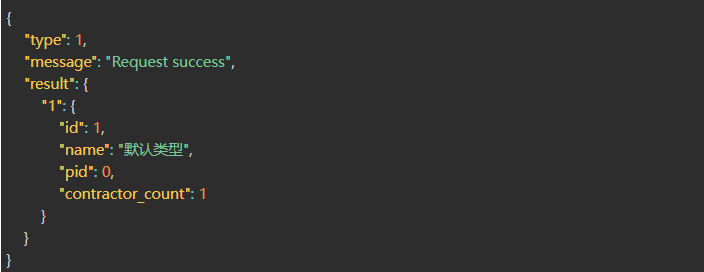
result – Statistics by job type
| Field | Type | Description |
| id | Number | Job ID |
| pid | Number | Parent |
| name | String | Job Name |
| contractor_count | Number | Number of Employees under Job |
result – Statistics by unit
| Field | Type | Description |
| id | Number | Unit ID |
| pid | Number | Parent |
| name | String | Unit Name |
| contractor_count | Number | Number of Contractors under this Unit |
Correct Return Example
1.POST Address
http://ip:port/EHCommon/pit/pitRecord/getRecordByMaterial
2.Parameter Description
| Field | Required or not | Type | Description |
| scene_id | √ | Number | Scene ID |
| order | √ | Object | Sort by [{“id” => 1, “pid” => 0, “sorting”: 1}] |
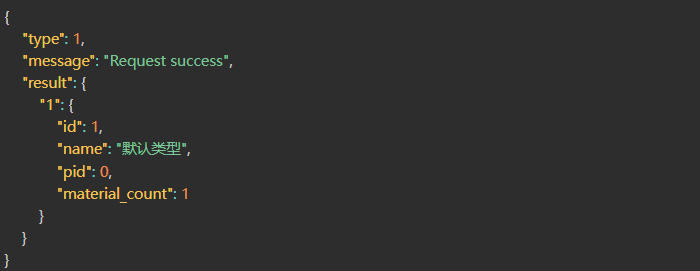
3.Success 200
| Field | Type | Description |
| result | Object[] | Result Set |
| id | Number | Material Type ID |
| pid | Number | Parent |
| name | String | Material Type Name |
| material_count | Number | Quantity of Materials under Material Type |
Correct Return Example
1.POST Address
http://ip:port/EHCommon/pit/pitRecord/getRecordByTruck
2.Parameter Description
| Field | Required or not | Type | Description |
| scene_id | √ | Number | Scene ID |
| order | √ | Object | Sort by [{“id” => 1, “pid” => 0, “sorting”: 1}] |
3.Success 200
| Field | Type | Description |
| result | Object[] | Result Set |
| id | Number | Vehicle Type ID |
| pid | Number | Parent Level |
| name | String | Vehicle Type Name |
| truck_count | Number | Number of Vehicles under the Vehicle Type |
Correct Return Example

1.POST Address
http://ip:port/EHCommon/pit/pitRecord/getRecordByVisitor
2.Parameter Description
| Field | Required or not | Type | Description |
| scene_id | √ | Number | Scene ID |
| order | √ | Object | Sort by [{“id” => 1, “pid” => 0, “sorting”: 1}] |
3.Success 200
| Field | Type | Description |
| result | Object[] | Result Set |
| id | Number | Unit ID |
| pid | Number | Parent Level |
| name | String | Unit Name |
| visitor_count | Number | Number of Visitors under the Unit |
Correct Return Example

Downhole and Uphole Records
1.POST Address
http://ip:port/EHCommon/pit/pitRecord/exportDayPitRecord
2.Parameter Description
| Field | Required or not | Type | Description |
| data_list | Object[] | Records to be exported | |
| start_time | Number | Pit entry time | |
| end_time | Number | Pit exit time | |
| page | Number | Pagination | |
| limit | Number | Page size | |
| up_down_status | Number | Well access status [1-On well, 2-Under well] | |
| utype | Number | Positioning object type [1-Personnel, 2-Vehicle, 3-Visitor, 5-Material, 6-Contractor, 0-Unknown card] | |
| serial_num | String | Material No. (fuzzy query) | |
| person_name | String | Employee name (fuzzy query) | |
| visitor_name | String | Visitor name (fuzzy query) | |
| licence | String | License plate number (fuzzy query) | |
| driver | String | Vehicle driver (fuzzy query) | |
| material_name | String | Material name (fuzzy query) | |
| contractor_name | String | Contractor name (fuzzy query) | |
| card_id | Number | Card number | |
| work_type_id | Number | Employee work type ID, Contractor work type ID | |
| duty_name | Number | Post ID | |
| degree | Number | Education background | |
| sex | Number | Gender of employee, visitor and contractor | |
| person_class | Number | Personnel classification | |
| nation | Number | Ethnicity of employee and contractor | |
| branch_id | Number | Department, Visitor | |
| source | Number | Data source, Contractor | |
| unit_id | Number | Contractor company, Vehicle | |
| type | Number | Vehicle type, Material type |
| Field | Required or not | Type | Description |
| data_list | Object[] | Records to be exported | |
| start_time | Number | Pit entry time | |
| end_time | Number | Pit exit time | |
| page | Number | Pagination | |
| limit | Number | Page size | |
| up_down_status | Number | Well access status [1-On well, 2-Under well] | |
| utype | Number | Positioning object type [1-Personnel, 2-Vehicle, 3-Visitor, 5-Material, 6-Contractor, 0-Unknown card] | |
| serial_num | String | Material No. (fuzzy query) | |
| person_name | String | Employee name (fuzzy query) | |
| visitor_name | String | Visitor name (fuzzy query) | |
| licence | String | License plate number (fuzzy query) | |
| driver | String | Vehicle driver (fuzzy query) | |
| material_name | String | Material name (fuzzy query) | |
| contractor_name | String | Contractor name (fuzzy query) | |
| card_id | Number | Card number | |
| work_type_id | Number | Employee work type ID, Contractor work type ID | |
| duty_name | Number | Post ID | |
| degree | Number | Education background | |
| sex | Number | Gender of employee, visitor and contractor | |
| person_class | Number | Personnel classification | |
| nation | Number | Ethnicity of employee and contractor | |
| branch_id | Number | Department, Visitor | |
| source | Number | Data source, Contractor | |
| unit_id | Number | Contractor company, Vehicle | |
| type | Number | Vehicle type, Material type |
3.Success 200
1.POST Address
http://ip:port/EHCommon/pit/pitRecord/exportMonthPitRecord
2.Parameter Description
| Field | Required or not | Type | Description |
| start_time | Number | Downhole Time | |
| end_time | Number | Uphole Time | |
| branch_id | Number | Department ID | |
| duty_id | Number | Job ID | |
| person_class_id | Number | Personnel Category ID | |
| card_id | Number | Card Number | |
| person_name | String | Employee Name | |
| visitor_name | String | Visitor Name | |
| driver | String | Driver | |
| contractor_name | String | Contractor Name | |
| material_name | String | Material Name | |
| licence | String | License Plate Number | |
| serial_num | String | Material Number | |
| truck_type_id | String | Vehicle Type | |
| material_type_id | String | Material Type | |
| page | Number | Pagination | |
| limit | Number | Pagination Size | |
| utype | Number | Location Target Type [1 Personnel, 2 Vehicles, 3 Visitors, 5 Materials, 6 Contractors, 0 Unknown Cards] |
3.Success 200
1.POST Address
http://ip:port/EHCommon/pit/pitRecord/exportPitRecordPrimitive
2.Parameter Description
| Field | Required or not | Type | Description |
| id_list | Number[] | List of entry/exit records IDs [1 2 3] | |
| start_time | Number | Start Time | |
| end_time | Number | End Time | |
| branch_id | Number | Department ID | |
| duty_id | Number | Job ID | |
| person_class_id | Number | Personnel Category ID | |
| card_id | Number | Card Number | |
| flag | String | Name and Employee ID | |
| page | Number | Pagination | |
| limit | Number | Pagination Size | |
| up_down_pit | Number | Entry/Exit Records [1 Entering the Mine 2 Entering the Mine] | |
| truck_type_id | String | Vehicle Type | |
| material_type_id | String | Material Type |
3.Success 200
1.POST Address
http://ip:port/EHCommon/pit/pitRecord/exportRecord
2.Parameter Description
| Field | Required or not | Type | Description |
| uuid | Number | Binding Object ID | |
| card_id | Number | Card Number | |
| begin | Number | Start Time | |
| end | Number | End Time | |
| time_type | Number | Time Type, 1 Enter Time, 2 Leave Time, 3 Duration | |
| up_down_status | Number | 0 Go Down Mine 1 Go Up Mine, No Transmission as All | |
| type | Number | 1 No Record Go Up Mine 2 No Record Go Down Mine 3 Record Go Up Mine 4 Record Go Down Mine | |
| branch_id | Number | Department ID | |
| person_class_id | Number | Personnel Category ID | |
| duty_id | Number | Job ID | |
| job_num | String | Employee ID | |
| name | String | Name | |
| person_name | String | Employee Name | |
| visitor_name | String | Visitor Name | |
| driver | String | Driver | |
| material_name | String | Material Name | |
| licence | String | License Plate Number | |
| contractor_name | String | Contractor Name | |
| serial_num | String | Material Number | |
| status | Number | 1 Normal, 2 Calibrateable | |
| access_status | Number | 1 Enter, 2 Leave | |
| utype | Number | Location Object Type [1 Personnel, 2 Vehicle, 3 Visitor, 5 Material, 6 Contractor, 0 Unknown Card] | |
| work_type_id | Number | Employee Job ID, Contractor Job ID | |
| duty_name | Number | Job ID | |
| degree | Number | Education Level | |
| sex | Number | Employee Gender, Visitor Gender, Contractor Gender | |
| person_class | Number | Employee Category | |
| nation | Number | Employee Ethnicity, Contractor Ethnicity | |
| branch_id | Number | Department | |
| source | Number | Visitor | |
| unit_id | Number | Data Source | |
| type | Number | Contractor |
3.Success 200
1.POST Address
http://ip:port/EHCommon/pit/pitRecord/exportWeekPitRecord
2.Parameter Description
| Field | Required or not | Type | Description |
| start_time | Number | Downhole Time | |
| end_time | Number | Uphole Time | |
| branch_id | Number | Department ID | |
| duty_id | Number | Job ID | |
| person_class_id | Number | Personnel Category ID | |
| card_id | Number | Card Number | |
| person_name | String | Employee Name | |
| visitor_name | String | Visitor Name | |
| driver | String | Driver | |
| material_name | String | Material Name | |
| licence | String | License Plate Number | |
| serial_num | String | Material Number | |
| truck_type_id | String | Vehicle Type | |
| material_type_id | String | Material Type | |
| page | Number | Pagination | |
| limit | Number | Pagination Size | |
| utype | Number | Location Target Type [1 Personnel, 2 Vehicles, 3 Visitors, 5 Materials, 6 Contractors, 0 Unknown Cards] | |
| contractor_name | String | Contractor Name, Fuzzy Search |
3.Success 200
1.POST Address
http://ip:port/EHCommon/pit/pitRecord/getDayPitRecord
2.Parameter Description
| Field | Required or not | Type | Description |
| start_time | Number | Start Time | |
| end_time | Number | End Time | |
| page | Number | Pagination | |
| limit | Number | Pagination Size | |
| up_down_status | Number | Up/Down Well Status [1 Up Well 2 Down Well] | |
| uuid_list | Number[] | UUID List | |
| utype | Number | Location Object Type [1 Personnel, 2 Vehicles, 3 Visitors, 5 Materials, 6 Contractors, 0 Unknown Cards] | |
| serial_num | String | Material Number, Fuzzy Search | |
| person_name | String | Employee Name, Fuzzy Search | |
| visitor_name | String | Visitor Name, Fuzzy Search | |
| licence | String | Vehicle License Plate Number, Fuzzy Search | |
| driver | String | Vehicle Driver, Fuzzy Search | |
| material_name | String | Material Name, Fuzzy Search | |
| contractor_name | String | Contractor Name, Fuzzy Search | |
| card_id | Number | Card Number | |
| work_type_id | Number | Employee Job ID, Contractor Job ID | |
| duty_name | Number | Position ID | |
| degree | Number | Education Level | |
| sex | Number | Employee Gender, Visitor Gender, Contractor Gender | |
| person_class | Number | Employee Category | |
| nation | Number | Employee Ethnicity, Contractor Ethnicity | |
| branch_id | Number | Department, Visitor | |
| source | Number | Data Source, Contractor | |
| unit_id | Number | Contractor Organization, Vehicle | |
| type | Number | Vehicle Type, Material Type |
3.Success 200
| Field | Type | Description |
| message | String | Interface Request Message |
| type | Number | Interface Request Status |
| result | Object | Return Result |
| data | Object[] | List of Mine Access Records |
| uuid | Number | Employee UUID |
| utype | Number | 1 Employee |
| card_id | Number | 2 Vehicle |
| down_pit_count | Number | 3 Visitor |
| up_pit_count | Number | 5 Materials |
| up_down_time | String | 6 Contractor |
| stay_time | String | Card Number |
| name | String | Number of Mining Descendants |
| job_num | String | Number of Returning Mines |
| duty_name | String | Date [Year-Month-Day] |
| branch_name | String | Mine Access Duration |
| person_class_name | String | Name |
| up_down_status | String | Employee ID |
| last_down_time | Number | Position |
| latest_in_pit | Number | Department Name |
| related_info | String | Employee Category Name |
| id_list | String | Mine Access Status [Underground, Aboveground] |
| count | Number | Last Mining Descendant Time (used for leaving button detection) |
Correct Return Example
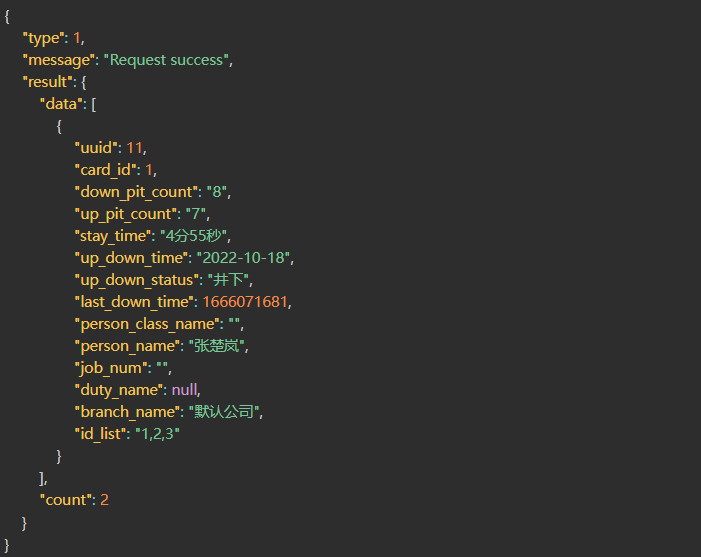
1.POST Address
http://ip:port/EHCommon/pit/pitRecord/getDayPitRecord
2.Parameter Description
| Field | Required or not | Type | Description |
| start_time | Number | Start Time | |
| end_time | Number | End Time | |
| branch_id | Number | Department ID | |
| duty_id | Number | Job ID | |
| person_class_id | Number | Personnel Category ID | |
| card_id | Number | Card Number | |
| person_name | String | Employee Name | |
| visitor_name | String | Visitor Name | |
| contractor_name | String | Contractor Name | |
| driver | String | Driver | |
| material_name | String | Material Name | |
| licence | String | License Plate Number | |
| serial_num | String | Material Number | |
| truck_type_id | String | Vehicle Type | |
| material_type_id | String | Material Type | |
| utype | Number[] | 1 Employee 2 Vehicle 3 Visitor 5 Material 6 Contractor |
|
| page | Number | Pagination | |
| limit | Number | Pagination Size |
3.Success 200
| Field | Type | Description |
| message | String | Interface Request Message |
| type | Number | Interface Request Status |
| result | Object | Return Result |
| data | Object[] | List of Mine Dive/Retreat Records |
| uuid | Number | Employee UUID |
| card_id | Number | Card Number |
| down_pit_count | Number | Number of Dives |
| up_pit_count | Number | Number of Returns |
| up_down_time | String | Date [Year-Month] |
| stay_time | String | Dive Duration |
| person_name | String | Employee Name |
| job_num | String | Employee ID |
| duty_name | String | Position |
| branch_name | String | Department Name |
| related_info | String | Related Information |
| utype | Number | 1. Employee 2. Vehicle 3. Visitor 5. Materials 6. Contractor |
| name | String | Location Object Name [Employee Name, Visitor Name, License Plate Number, Material Number, Contractor Name] |
| count | Number | Total Number of Mine Dive/Retreat Records |
Correct Return Example
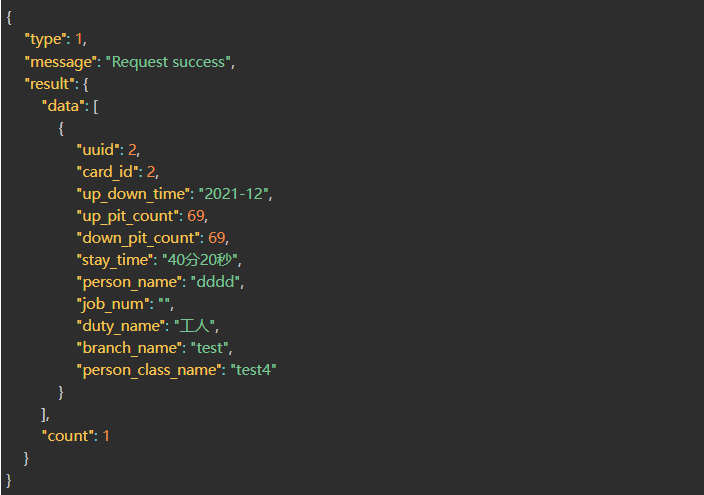
1.POST Address
http://ip:port/EHCommon/pit/pitRecord/getPitLocatorData
2.Parameter Description
| Field | Required or not | Type | Description |
| person_name | String | Employee Name | |
| job_num | String | Employee ID | |
| visitor_name | String | Visitor Name | |
| licence | String | License Plate | |
| serial_num | String | Material Number | |
| card_id | String | Card Number | |
| accurate_card_id | String | Card Number Detailed Search | |
| contractor_name | String | Contractor Name |
3.Success 200
| Field | Type | Description |
| result | Object[] | Result Set |
| uuid | Number | Unique ID |
| utype | Number | Tag Type (1 Personnel/2 Vehicle/3 Visitor/4 Vehicle Card/5 Supplies 6 Contractor) |
| floor_id | Number | Floor ID |
| card_id | Number | Card Number |
| floor_name | String | Floor Name |
| building_id | Number | Building ID |
| building_name | String | Building Name |
| scene_id | Number | Scene ID |
| scene_name | String | Scene Name |
| person_name | String | Personnel Name |
| job_num | String | Employee ID |
| visitor_name | String | Visitor Name |
| unit | String | Visitor Company |
| licence | String | License Plate |
| driver | String | Driver Name |
| branch_id | Number | Department ID |
| branch_name | String | Department Name |
| relation | Object | (For vehicle information, there are sub-cards corresponding to the main card information) |
| serial_num | String | Supply Number |
| material_name | String | Supply Name |
| type_name | String | Supply Type Name |
| contractor_name | String | Contractor Name |
| work_type_name | String | Contractor Job Type |
| unit_name | String | Contractor Company Name |
Correct Return Example
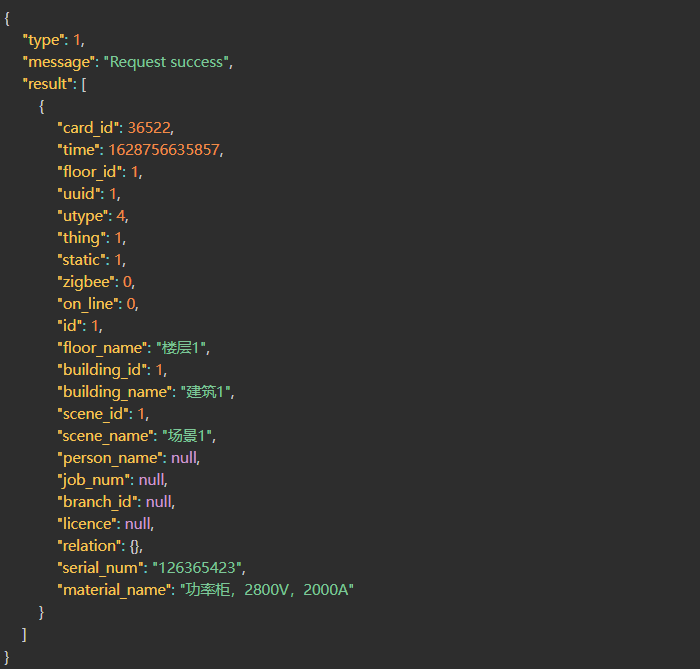
1.POST Address
http://ip:port/EHCommon/pit/pitRecord/getPitRecordDetail
2.Parameter Description
| Field | Required or not | Type | Description |
| up_down_time | √ | Number | Search for records for this day/week/month based on the time of entry/exit from the well. |
| type | √ | Number | Type [0 days 1 week 2 months] |
| uuid | √ | Number | Employee UUID |
3.Success 200
| Field | Type | Description |
| message | String | Interface Request Message |
| type | Number | Interface Request Status |
| result | Object | Return Result |
| data | Object[] | List of Well Dive/Exit Records |
| down_time | String | Dive Time |
| up_time | String | Exit Time |
| stay_time | String | Distance Time |
| count | Number | Total Number of Well Dive/Exit Records |
Correct Return Example
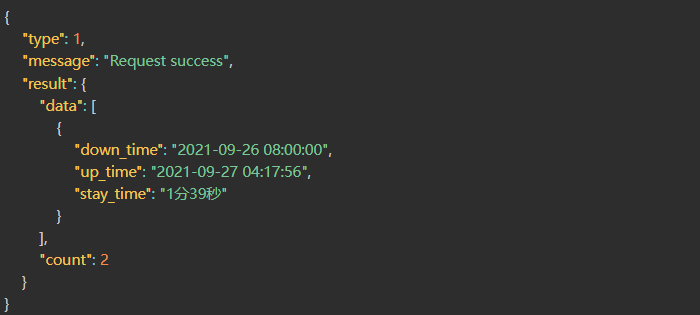
1.POST Address
http://ip:port/EHCommon/pit/pitRecord/getPitRecordPrimitive
2.Parameter Description
| Field | Required or not | Type | Description |
| start_time | Number | Start Time | |
| end_time | Number | End Time | |
| page | Number | Pagination | |
| limit | Number | Pagination Size | |
| up_down_pit | Number | Up/Down Mine [1 Up Mine 2 Down Mine] | |
| utype | Number | Location Object Type [1 Personnel, 2 Vehicles, 3 Visitors, 5 Materials, 6 Contractors, 0 Unknown Cards] | |
| serial_num | String | Material Number, Fuzzy Search | |
| person_name | String | Employee Name, Fuzzy Search | |
| visitor_name | String | Visitor Name, Fuzzy Search | |
| licence | String | Vehicle License Plate Number, Fuzzy Search | |
| driver | String | Vehicle Driver, Fuzzy Search | |
| material_name | String | Material Name, Fuzzy Search | |
| contractor_name | String | Contractor Name, Fuzzy Search | |
| card_id | Number | Card Number | |
| work_type_id | Number | Employee Job ID, Contractor Job ID | |
| duty_name | Number | Position ID | |
| degree | Number | Education Level | |
| sex | Number | Employee Gender, Visitor Gender, Contractor Gender | |
| person_class | Number | Employee Classification | |
| nation | Number | Employee Ethnicity, Contractor Ethnicity | |
| branch_id | Number | Department Visitors | |
| source | Number | Data Source Contractors | |
| unit_id | Number | Contractor Units Vehicles | |
| type | Number | Vehicle Type, Material Type |
3.Success 200
| Field | Type | Description |
| message | String | Interface Request Message |
| type | Number | Interface Request Status |
| result | Object | Return Result |
| data | Object[] | List of Mine Dive/Earth Dive Records |
| id | Number | Mine Dive/Earth Dive Record ID |
| uuid | Number | Employee UUID |
| card_id | Number | Card Number |
| up_down_time | String | Mine Dive/Earth Dive Time |
| person_name | String | Employee Name |
| type | Number | Action [0 Down Mine 1 Up Mine] |
| up_down_pit | String | Mine Dive/Earth Dive [Down Mine Up Mine] |
| job_num | String | Employee ID |
| duty_name | String | Position |
| branch_name | String | Department Name |
| related_info | String | Related Information |
| person_class_name | String | Employee Category Name |
| utype | Number | 1 Employee 2 Vehicle 3 Visitor 5 Materials 6 Contractor |
| name | String | Location Object Name [Employee Name, Visitor Name, License Plate Number, Material Number, Contractor Name] |
| count | Number | Total Number of Mine Dive/Earth Dive Records |
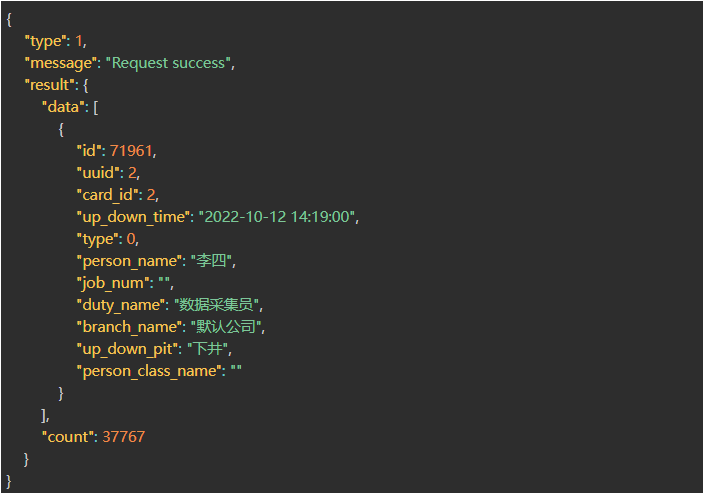
Correct Return Example
1.POST Address
http://ip:port/EHCommon/pit/pitRecord/getRecord
2.Parameter Description
| Field | Required or not | Type | Description |
| first_id | Number | The first temporary data returned is | |
| scene_id | Number | Scenario ID | |
| uuid | Number | Bound Object ID | |
| card_id | Number | Card Number | |
| begin | Number | Start Time | |
| end | Number | End Time | |
| time_type | Number | Time Type, 1 Enter Time, 2 Leave Time, 3 Duration | |
| up_down_status | Number | 0 Go Down Mine 1 Go Up Mine, not transmitted as all |
|
| type | Number | 1 No record Go Up Mine 2 No record Go Down Mine 3 Record Go Up Mine 4 Record Go Down Mine |
|
| job_num | String | Employee ID | |
| person_name | String | Employee Name | |
| visitor_name | String | Visitor Name | |
| driver | String | Driver | |
| material_name | String | Material Name | |
| licence | String | License Plate Number | |
| contractor_name | String | Contractor Name | |
| serial_num | String | Material Number | |
| utype | Number[] | 1 Employee 2 Vehicle 3 Visitor 5 Material 6 Contractor |
|
| page | Number | Pagination starts from 1 | |
| limit | Number | Number per Page | |
| homepage | Number | 1 indicates this is the homepage calling this interface, limited to 300 records | |
| status | Number | 1 Normal, 2 Calibrateable | |
| access_status | Number | 1 Enter, 2 Leave | |
| work_type_id | Number | Employee job ID, contractor job ID | |
| duty_name | Number | Job ID | |
| degree | Number | Education Level | |
| sex | Number | Employee Gender, Visitor Gender, Contractor Gender | |
| person_class | Number | Employee Category | |
| nation | Number | Employee Ethnicity, Contractor Ethnicity | |
| branch_id | Number | Department Visitors | |
| source | Number | Data Source Contractors | |
| unit_id | Number | Contractor Units Vehicles | |
| type | Number | Vehicle Type, Material Type |
3.Success 200
| Field | Type | Description |
| message | String | Interface Request Message |
| type | Number | Interface Request Status |
| result | String | Leaving Result |
| count | Number | Total Result |
| data | Object[] | Result Pagination List |
| id | Number | Auto-incrementing Record ID |
| uuid | Number | Bound ID |
| name | String | Name |
| card_id | Number | Card Number |
| job_num | Number | Employee ID |
| branch_id | Number | Department ID |
| duty_id | Number | Job ID |
| class_ids | Number | Personnel Category ID List |
| down_time | Number | Downhole Timestamp |
| up_time | Number | Uphole Timestamp |
| stay_time | String | Stay Time, Character Type |
| up_down_status | Number | 0 Uphole 1 Uphole |
| related_info | String | Related Information |
| update_time | Number | Update Second Timestamp |
| type | Number | Record Status |
| card_type_name | String | Card Type Name |
| utype | Number | 1 Employee 2 Vehicle 3 Visitor 5 Materials 6 Contractor |
| status | Number | 1 Normal 2 Calibrateable 3 Normal (Calibrated) |
| access_status | Number | 1 Enter, 2 Leave |
| in_pit_time_flag | Number | 0 Normal 1 Manual Calibration |
| up_pit_time_flag | Number | 0 Normal 1 Manual Calibration |
Correct Return Example

1.POST Address
http://ip:port/EHCommon/pit/pitRecord/getRecordByPerson
2.Parameter Description
| Field | Required or not | Type | Description |
| scene_id | √ | Number | Scene ID |
| query_way | √ | Number | Query Method: 1. Query by Department, 2. Query by Job Type, 3. Query by Position, 4. Statistical Statistics by Personnel Category |
| order | √ | Object | Sorting Method: [{“id” => 1, “pid” => 0, “sorting”: 1}] |
3.Success 200
| Field | Type | Description |
| result | Object | Result Set |
| res | Object[] | Classification and Statistical Result Set |
result – Statistics by department
| Field | Type | Description |
| id | Number | Department ID |
| pid | Number | Parent |
| name | String | Department Name |
| person_count | Object | Department Name Employee Count |
| node | Object[] | Child Department Data |
| name | String | Child Department Name |
| id | Number | Child Department ID |
| pid | Number | Parent |
| person_count | Object[] | Department Name Employee Count |
result – Statistics by job type
| Field | Type | Description |
| id | Number | Job ID |
| pid | Number | Parent |
| name | String | Job Name |
| person_count | Number | Number of Employees under Job |
result – Statistics by job title
| Field | Type | Description |
| id | Number | Job ID |
| pid | Number | Parent |
| name | String | Job Title |
| person_count | Number | Number of Employees under this Job |
result – Statistics by personnel category
| Field | Type | Description |
| id | Number | Personnel Category ID |
| pid | Number | Parent |
| name | String | Personnel Category Name |
| person_count | Number | Number of Personnel under Personnel Category |
Correct Return Example
1.POST Address
http://ip:port/EHCommon/pit/pitRecord/getRecordStatistics
2.Parameter Description
| Field | Required or not | Type | Description |
| type_id | √ | Number | ID Type: 1. Scene; 2. Entrance/Exit Overload; 3. Entrance/Exit Staff Shortage |
| scene_id | √ | Number | Scenario ID |
3.Success 200
| Field | Type | Description |
| result | Object | Results Set |
| person_pit_num | Number | Employees Underground Number |
| visitor_pit_num | Number | Visitors Underground Number |
| truck_pit_num | Number | Vehicles Underground Number |
| material_pit_num | Number | Supplies Underground Number |
| contractor_pit_num | Number | Contractors Underground Number |
| pit_alarm_num | Number | Underground Overcapacity Limit Number of Personnel |
| card_type_num_list | Object[] | List of Card Quantities by Card Type |
| name | String | Card Type |
| person_pit_num | Number | Employee Card Type Quantity |
| truck_pit_num | Number | Vehicle Card Type Quantity |
| material_pit_num | Number | Supplies Card Type Quantity |
| visitor_pit_num | Number | Visitor Card Type Quantity |
| contractor_pit_num | Number | Contractor Card Type Quantity |
| pit_rule_flag | Number | 0 Display Type Card |
Correct Return Example
1.POST Address
http://ip:port/EHCommon/pit/pitRecord/getUpDownPitStatusForAll
2.Parameter Description
3.Success 200
| Field | Type | Description |
| message | String | API Request Message |
| type | Number | API Request Status |
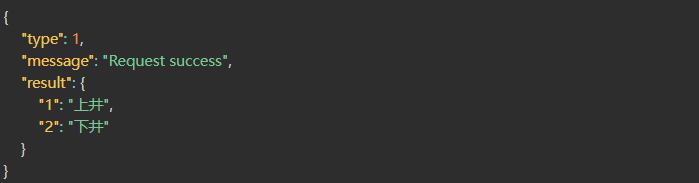
| result | Object | Keys are filter criteria, values are displayed on the page; 1 indicates going up, 2 indicates going down, all concatenated by the page. |
Correct Return Example
1.POST Address
http://ip:port/EHCommon/pit/pitRecord/getUpDownPitStatusForDay
2.Parameter Description
3.Success 200
| Field | Type | Description |
| message | String | API Request Message |
| type | Number | API Request Status |
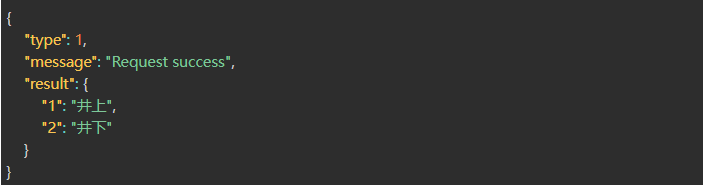
| result | Object | Keys are filter criteria, values are displayed on the page; 1 indicates above the well, 2 indicates below the well, all values are concatenated by the page. |
Correct Return Example
1.POST Address
http://ip:port/EHCommon/pit/pitRecord/getValidScene
2.Parameter Description
3.Success 200
| Field | Type | Description |
| message | String | Interface Request Message |
| batchDelete | Number | Interface Request Status |
| result | Object[] | Result List |
| scene_name | String | Scenario Name |
| scene_id | Number | Scenario ID |
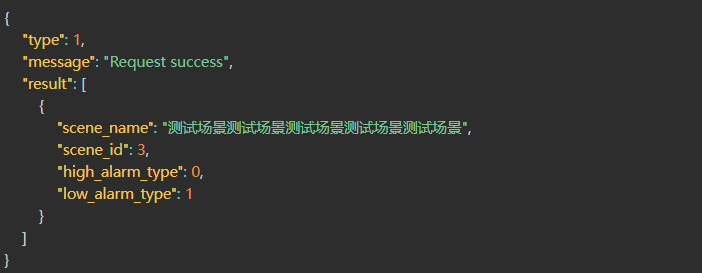
| high_alarm_type | Number | Entrance/Exit Exceedance Type (Rule 0: None, Rule 1: Yes) |
| low_alarm_type | String | Entrance/Exit Staff Shortage Type (Rule 0: None, Rule 1: Yes) |
Correct Return Example
1.POST Address
http://ip:port/EHCommon/pit/pitRecord/getWeekPitRecord
2.Parameter Description
| Field | Required or not | Type | Description |
| start_time | Number | Start Time | |
| end_time | Number | End Time | |
| branch_id | Number | Department ID | |
| duty_id | Number | Job ID | |
| person_class_id | Number | Personnel Category ID | |
| card_id | Number | Card Number | |
| person_name | String | Employee Name | |
| visitor_name | String | Visitor Name | |
| contractor_name | String | Contractor Name | |
| driver | String | Driver | |
| material_name | String | Material Name | |
| licence | String | License Plate Number | |
| serial_num | String | Material Number | |
| truck_type_id | String | Vehicle Type | |
| material_type_id | String | Material Type | |
| utype | Number[] | 1 Employee 2 Vehicle 3 Visitor 5 Material 6 Contractor |
|
| page | Number | Pagination | |
| limit | Number | Pagination Size |
3.Success 200
| Field | Type | Description |
| message | String | Interface Request Message |
| type | Number | Interface Request Status |
| result | Object | Return Result |
| data | Object[] | List of Mine Dive/Retreat Records |
| uuid | Number | Employee UUID |
| card_id | Number | Card Number |
| down_pit_count | Number | Number of Dives |
| up_pit_count | Number | Number of Returns |
| up_down_time | String | Date [Year-Week] |
| stay_time | String | Dive Duration |
| person_name | String | Employee Name |
| job_num | String | Employee ID |
| duty_name | String | Position |
| branch_name | String | Department Name |
| related_info | String | Related Information |
| person_class_name | String | Employee Category Name |
| utype | Number | 1 Employee 2 Vehicles 3 Visitors 5 Materials 6 Contractors |
| name | String | Location Object Name [Employee Name, Visitor Name, License Plate Number, Material Number, Contractor Name] |
| count | Number | Total Number of Mine Dive/Retreat Records |
Correct Return Example
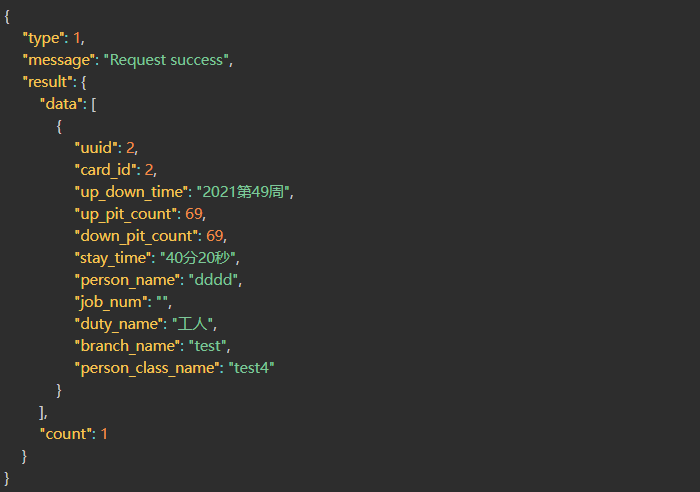
1.POST Address
http://ip:port/EHCommon/pit/pitRecord/inUpDownArea
2.Parameter Description
| Field | Required or not | Type | Description |
| scene_id | Number | Scene ID | |
| id | Number | Record ID (with ID indicates entering calibration; without ID indicates adding) | |
| uuid | √ | Number | Personnel UUID |
| in_time | √ | Number | Upon arrival time (second-level Unix timestamp) |
3.Success 200
| Field | Type | Description |
| message | String | API Request Message |
| type | Number | API Request Status |
| result | Object | Leave Result |
| id | Number | Modify ID |
Correct Return Example
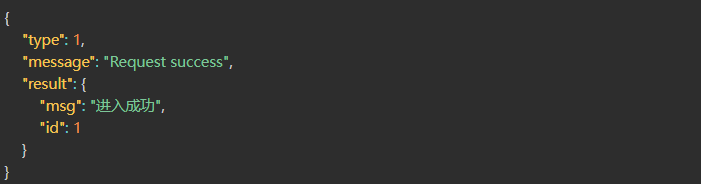
1.POST Address
http://ip:port/EHCommon/pit/pitRecord/leaveUpDownArea
2.Parameter Description
| Field | Required or not | Type | Description |
| id | √ | Number | Record ID |
| uuid | √ | Number | Personnel UUID |
| leave_time | √ | Number | Time of arrival at the well, second-level Unix timestamp |
3.Success 200
| Field | Type | Description |
| message | String | API Request Message |
| type | Number | API Request Status |
| result | Object | Leave Result |
| id | Number | Modify ID |
Correct Return Example
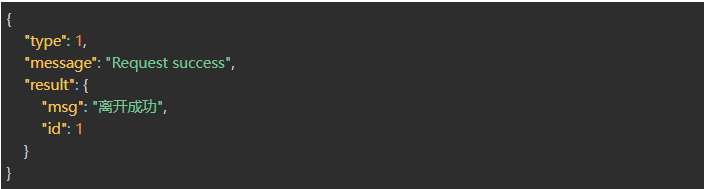
Accident Alarm
1.POST Address
http://ip:port/EHCommon/alarm/AccidentAlarm/batchDelete
2.Parameter Description
| Field | Required or not | Type | Description |
| id_list | √ | Number[] | Accident ID List |
3.Success 200
| Field | Type | Description |
| ype | Number | Response Status Code |
| message | String | Response Message |
| result | String | Response Result |
{“type”:1,”message”:”Request succeeded”,”result”:”Successfully deleted 20 pieces of data in batches”}

1.POST Address
http://ip:port/EHCommon/alarm/AccidentAlarm/export
2.Parameter Description
| Field | Required or not | Type | Description |
| scene_id | Number | Scene ID | |
| building_id | Number | Building ID | |
| floor_id | Number | Floor ID | |
| areas | Object[] | Region, such as {“1”: [1]}, key is region group ID, value is region list | |
| status | Number | Alarm status, 1 ended, 0 alarm in progress | |
| deal_status | Number | Processing status, 1 processed, 0 not processed | |
| alarm_reason_id | Number | Alarm reason ID | |
| id_list | Number[] | Accident alarm ID list | |
| order | √ | String | Sorting method |
| field | √ | String | Sorting field |
| begin | Number | Start timestamp | |
| end | Number | End timestamp | |
| time_type | Number | Time type, 1 alarm duration, 2 alarm start time, 3 alarm end time | |
| utype | Number | Location object type [1 personnel, 2 vehicles, 3 visitors, 5 materials, 6 contractors, 0 unfamiliar cards] | |
| serial_num | String | Material number, fuzzy query | |
| person_name | String | Employee name, fuzzy query | |
| visitor_name | String | Visitor name, fuzzy query | |
| licence | String | Vehicle license plate number, fuzzy query | |
| driver | String | Vehicle driver, fuzzy query | |
| material_name | String | Material name, fuzzy query | |
| contractor_name | String | Contractor name, fuzzy query | |
| card_id | Number | Card number | |
| work_type_id | Number | Employee job ID, contractor job ID | |
| duty_name | Number | Position ID | |
| degree | Number | Education | |
| sex | Number | Employee gender, visitor gender, contractor gender | |
| person_class | Number | Employee classification | |
| nation | Number | Employee ethnicity, contractor ethnicity | |
| branch_id | Number | Department Visitor | |
| source | Number | Data source Contractor | |
| unit_id | Number | Contractor unit Vehicle | |
| type | Number | Vehicle type, material type |
3.Success 200
1.POST Address
http://ip:port/EHCommon/alarm/AccidentAlarm/get
2.Parameter Description
| Field | Required or not | Type | Description |
| homepage_start_time | Number | Start Time | |
| homepage_end_time | Number | End Time | |
| scene_id | Number | Scene ID | |
| building_id | Number | Building ID | |
| floor_id | Number | Floor ID | |
| areas | Object[] | Region, e.g., {“1”: [1]}, key is region group ID, value is region list | |
| status | Number | Alarm Status, 1 Ended, 0 Alarm in Progress | |
| deal_status | Number | Processing Status, 1 Processed, 0 Not Processed | |
| alarm_reason_id | Number | Alarm Reason ID | |
| uuid | Number | uuid | |
| order | √ | String | Sort Method |
| field | √ | String | Sort Field |
| begin | Number | Start Timestamp | |
| end | Number | End Timestamp | |
| time_type | Number | Time Type, 1 Alarm Duration, 2 Alarm Start Time, 3 Alarm End Time | |
| utype | Number | Location Object Type [1 Personnel, 2 Vehicles, 3 Visitors, 5 Materials, 6 Contractors, 0 Unknown Cards] | |
| serial_num | String | Material Number, Fuzzy Query | |
| person_name | String | Employee Name, Fuzzy Query | |
| visitor_name | String | Visitor Name, Fuzzy Query | |
| licence | String | Vehicle License Plate Number, Fuzzy Query | |
| driver | String | Vehicle Driver, Fuzzy Query | |
| material_name | String | Material Name, Fuzzy Query | |
| contractor_name | String | Contractor Name, Fuzzy Query | |
| card_id | Number | Card Number | |
| work_type_id | Number | Employee Job ID, Contractor Job ID | |
| duty_name | Number | Position ID | |
| degree | Number | Education | |
| sex | Number | Employee Gender, Visitor Gender, Contractor Gender | |
| person_class | Number | Employee Classification | |
| nation | Number | Employee Ethnicity, Contractor Ethnicity | |
| branch_id | Number | Department Visitor | |
| source | Number | Data Source Contractor | |
| unit_id | Number | Contractor Unit Vehicle | |
| type | Number | Vehicle Type, Material Type | |
| page | Number | ||
| limit | Number |
3.Success 200
| Field | Type | Description |
| result | Object | Result Set |
| count | Number | Quantity |
| data | Object[] | Accident Alarm Data |
| id | Number | id |
| bs_id | String | Base Station ID |
| bs_name | String | Base Station Name |
| location | String | Coordinates |
| alarm_id | String | ID corresponding to Alarm Reason |
| status | Number | Alarm Status [0 Alarm in Progress, 1 Completed] |
| start_time | Number | Alarm Start Time |
| end_time | Number | Alarm End Time |
| duration | Number | Alarm Duration |
| deal_status | Number | Status, 0 Unprocessed, 1 Processed |
| deal_person | String | Handler |
| deal_time | String | Handling Time |
| comment | String | Handling Content |
| utype | Number | Location Object Type [1 Personnel, 2 Vehicles, 3 Visitors, 5 Materials, 6 Contractors, 0 Unknown Cards] |
| name | String | Location Object Name [Employee Name, Visitor Name, License Plate Number, Material Number, Contractor Name] |
| related_info | String | Location Object Related Information [Department Name – Personnel Category, Unit, Vehicle Type – Driver Name, Material Type – Material Name, Unit – Job Type] |
| card_id | Number | Location Object Card Number |
| uuid | Number | Location Object UUID |
| map | String | Location Map |
| floor_id | String | Floor ID |
| show_area | String | Location Area |
| areas | Object[] | Location Area (for redirection) |
| area_id | Number | Area ID |
| area_name | Number | Area Name |
| type | Number | Area Type |
| group_id | Number | Area Group ID |
| group_name | Number | Area Group Name |
| type | Number | Interface response status [0 Login invalid, 1 Normal return, 100 Program error, 101 Parameter error, 102 Data read failure, 103 Dongle authentication failure, 104 No request header SN set or request header SN configuration error, 105 No reservation permission] |
| message | String | Interface response status description message |
Correct Return Example
{
“type”: 1,
“message”: “Request success”,
“result”: {
“count”: 24,
“data”: [
{
“id”: 24,
“utype”: 0,
“name”: “”,
“uuid”: 0,
“card_id”: 1909003,
“bs_id”: “0x59ca”,
“alarm_id”: “0”,
“status”: 0,
“start_time”: 1692352981,
“end_time”: null,
“scene_id”: 1,
“building_id”: 1,
“floor_id”: 1,
“area_id_list”: “[1, 4, 5, 9, 13, 15]”,
“location”: “x:6.00, y:7.80, z:6.00”,
“duration”: 19083710,
“deal_status”: 0,
“deal_time”: null,
“comment”: null,
“deal_person”: null,
“related_info”: null,
“bs_name”: null,
“map”: “场景1-建筑1-楼层1”,
“areas”: [
{
“id”: 1,
“type”: 1,
“area_name”: “全部”,
“group_id”: null,
“group_name”: null,
“area_id”: 1
},
{
“id”: 4,
“type”: 10,
“area_name”: “dier”,
“group_id”: null,
“group_name”: null,
“area_id”: 4
},
{
“id”: 5,
“type”: 9,
“area_name”: “diyi”,
“group_id”: null,
“group_name”: null,
“area_id”: 5
},
{
“id”: 9,
“type”: 1,
“area_name”: “全局”,
“group_id”: null,
“group_name”: null,
“area_id”: 9
},
{
“id”: 13,
“type”: 1,
“area_name”: “β”,
“group_id”: null,
“group_name”: null,
“area_id”: 13
},
{
“id”: 15,
“type”: 1,
“area_name”: “SS”,
“group_id”: null,
“group_name”: null,
“area_id”: 15
}
],
“show_area”: “全部,dier,diyi,全局,β,SS”
}
]
}
}
1.POST Address
http://ip:port/EHCommon/alarm/AccidentAlarm/getAlarmReasonDropdown
2.Parameter Description
3.Success 200
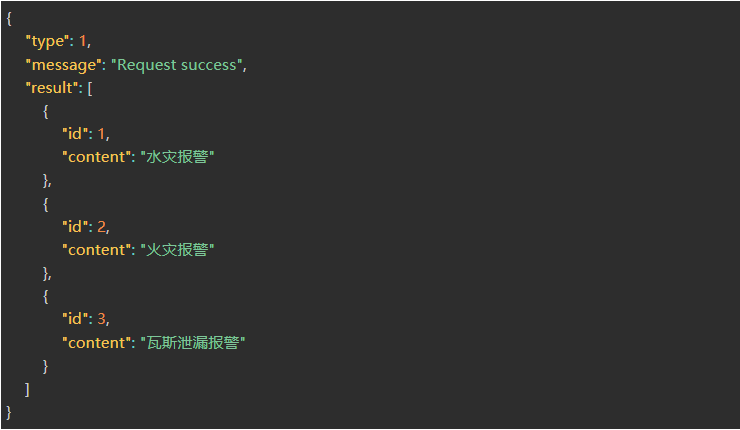
| Field | Type | Description |
| result | Object[] | Response Result |
| id | Number | Alarm Reason ID |
| content | String | Alarm Reason Text Description |
| type | Number | Interface Response Status [0 Login Failure, 1 Normal Return, 100 Program Error, 101 Parameter Error, 102 Data Reading Failure, 103 Dongle Authentication Failure, 104 Request Header SN Not Set or Request Header SN Configuration Error, 105 No Reservation Permission] |
| message | String | Interface Response Status Description Message |
Correct Return Example
1.POST Address
http://ip:port/EHCommon/alarm/AccidentAlarm/process
2.Parameter Description
| Field | Required or not | Type | Description |
| id_list | √ | Number[] | Incident ID List |
| status | √ | Number | Status 1: Processing, 0: Not Processing |
| comment | √ | Number | Processing Content |
| is_batch | √ | Number | 0: Single Processing, 1: Batch Processing |
3.Success 200
| Field | Type | Description |
| result | String | Response Results |
| type | Number | Interface Response Status [0 Login Failure, 1 Normal Return, 100 Program Error, 101 Parameter Error, 102 Data Reading Failure, 103 Dongle Authentication Failure, 104 No Request Header SN Set or Request Header SN Configuration Error, 105 No Reservation Permission] |
| message | String | Interface Response Status Description Message |
Correct Return Example

Second-Generation Visitor All-in-One Device
1.POST Address
http://ip:port/EHCommon/visitor/VisitorMachine/allCardIssuance
2.Parameter Description
3.Success 200
| Field | Type | Description |
| result | String | Result Set |
Correct Return Example

1.POST Address
http://ip:port/EHCommon/visitor/VisitorMachine/getCardList
2.Parameter Description
3.Success 200
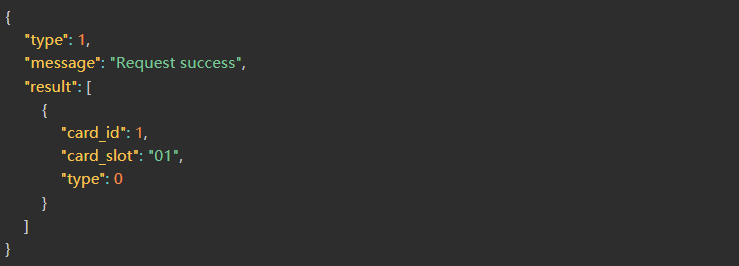
| Field | Type | Description |
| result | Object[] | Result Set |
| card_id | Number | Card Number |
| card_slot | String | Card Slot |
| type | String | Card Type: 0 Unknown, 1 Personnel, 2 Vehicle, 3 Visitor, 5 Supplies, 6 Contractor |
Correct Return Example
1.POST Address
http://ip:port/EHCommon/visitor/VisitorMachine/getMachineStatus
2.Parameter Description
3.Success 200
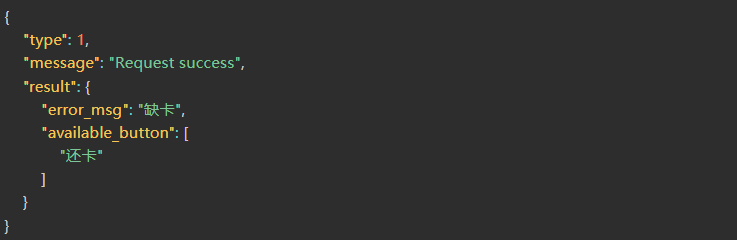
| Field | Type | Description |
| result | Object | Result Set |
Correct Return Example
1.POST Address
http://ip:port/EHCommon/visitor/VisitorMachine/manyCardIssuance
2.Parameter Description
| Field | Required or not | Type | Description |
| card_id_list | √ | Object[] | Card Information |
| card_id | √ | Number | Card Number |
| card_slot | √ | String | Card Slot |
3.Success 200
| Field | Type | Description |
| result | String | Result Set |
Correct Return Example

1.POST Address
http://ip:port/EHCommon/visitor/VisitorMachine/manyCardSlotIssuance
2.Parameter Description
| Field | Required or not | Type | Description |
| card_slot_list | √ | String[] | Card Slot Information List |
3.Success 200
| Field | Type | Description |
| result | String | Result Set |
Correct Return Example

1.POST Address
http://ip:port/EHCommon/visitor/VisitorMachine/randomCardIssuance
2.Parameter Description
3.Success 200
| Field | Type | Description |
| result | String | Result Set |
Correct Return Example

2D Icon
1.POST Address
http://ip:port/EHCommon/characterModel/Icon/getDefaultIcon
2.Parameter Description
3.Success 200
| Field | Type | Description |
| type | Number | Result Type |
| message | String | Result Description |
| result | Object[] | Result |
| id | String | Icon ID |
| icon_name | String | Icon Name |
| icon_things_type | Number | Configurable Type: 1-Employee, 2-Vehicle, 3-Visitor, 5-Material, 6-Base Station, 7-Contractor |
| icon_picture | Object | Icon URL Dictionary |
| model_2d_url | String | Icon (Online) |
| model_2d_s_url | String | Icon (Online – Selected) |
| model_2d_off_url | String | Icon (Offline) |
| model_2d_off_s_url | String | Icon (Offline – Selected) |
Correct Return Example
{
“type”: 1,
“message”: “Request success”,
“result”: [
{
“id”: 1,
“icon_name”: “员工默认图标”,
“icon_things_type”: 1,
“icon_picture”: {
“model_2d_url”: “/character_models/icon/person.png”,
“model_2d_s_url”: “/character_models/icon/person_s.png”,
“model_2d_off_url”: “/character_models/icon/person_off.png”,
“model_2d_off_s_url”: “/character_models/icon/person_off_s.png”
}
},
{
“id”: 2,
“icon_name”: “车辆默认图标”,
“icon_things_type”: 2,
“icon_picture”: {
“model_2d_url”: “/character_models/icon/truck.png”,
“model_2d_s_url”: “/character_models/icon/truck_s.png”,
“model_2d_off_url”: “/character_models/icon/truck_off.png”,
“model_2d_off_s_url”: “/character_models/icon/truck_off_s.png”
}
},
{
“id”: 3,
“icon_name”: “访客默认图标”,
“icon_things_type”: 3,
“icon_picture”: {
“model_2d_url”: “/character_models/icon/visitor.png”,
“model_2d_s_url”: “/character_models/icon/visitor_s.png”,
“model_2d_off_url”: “/character_models/icon/visitor_off.png”,
“model_2d_off_s_url”: “/character_models/icon/visitor_off_s.png”
}
},
{
“id”: 5,
“icon_name”: “物资默认图标”,
“icon_things_type”: 5,
“icon_picture”: {
“model_2d_url”: “/character_models/icon/material.png”,
“model_2d_s_url”: “/character_models/icon/material_s.png”,
“model_2d_off_url”: “/character_models/icon/material_off.png”,
“model_2d_off_s_url”: “/character_models/icon/material_off_s.png”
}
},
{
“id”: 1000,
“icon_name”: “基站默认图标”,
“icon_things_type”: 6,
“icon_picture”: {
“model_2d_url”: “/character_models/device/2D/unknown.png”,
“model_2d_s_url”: “/character_models/device/2D/unknown_s.png”,
“model_2d_off_url”: “/character_models/device/2D/unknown_o.png”,
“model_2d_off_s_url”: “/character_models/device/2D/unknown_o_s.png”
}
},
{
“id”: 1012,
“icon_name”: “承包商默认图标”,
“icon_things_type”: 7,
“icon_picture”: {
“model_2d_url”: “/character_models/icon/person.png”,
“model_2d_s_url”: “/character_models/icon/person_s.png”,
“model_2d_off_url”: “/character_models/icon/person_off.png”,
“model_2d_off_s_url”: “/character_models/icon/person_off_s.png”
}
}
]
}
1.POST Address
http://ip:port/EHCommon/characterModel/icon/add
2.Parameter Description
| Field | Required or not | Type | Description |
| icon_name | √ | String | Icon Name |
| icon_sex | √ | Number | Gender (0: None; 1: Differentiated) |
| icon_things_type | √ | Number | Applicable Tag Types (1: Employee; 2: Vehicle; 3: Visitor; 5: Asset) |
| icon_picture | √ | Object | Icon URL Dictionary |
| model_2d_url | √ | String | Icon (Online) |
| model_2d_s_url | √ | String | Icon (Online – Selected) |
| model_2d_off_url | √ | String | Icon (Offline) |
| model_2d_off_s_url | √ | String | Icon (Offline – Selected) |
| model_2d_alarm_url | √ | String | Alarm Status Icon (Online) |
| model_2d_alarm_s_url | √ | String | Alarm Status Icon (Online – Selected) |
| model_2d_alarm_off_url | √ | String | Alarm Status Icon (Offline) |
| model_2d_alarm_off_s_url | √ | String | Alarm Status Icon (Offline – Selected) |
| icon_picture_man | Object | Icon URL Dictionary (Male) — See icon_picture | |
| icon_picture_woman | Object | Icon URL Dictionary (Female) — See icon_picture | |
| comment | Number | Remarks |
3.Success 200
| Field | Type | Description |
| type | Number | Result Type |
| message | String | Result Description |
| result | Number | Result ID |
Correct Return Example

1.POST Address
http://ip:port/EHCommon/characterModel/icon/checkName
2.Parameter Description
| Field | Required or not | Type | Description |
| id | Number | 2D Icon ID | |
| name | √ | String | 2D Icon Name |
3.Success 200
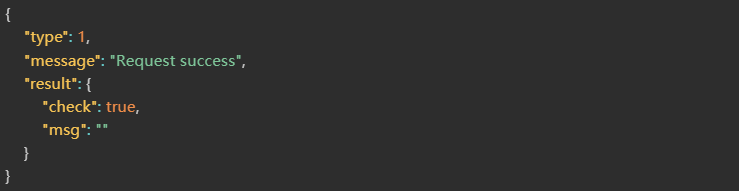
| Field | Type | Description |
| message | String | Interface Request Message |
| type | Number | Interface Request Status |
| result | Object | Request Result |
| check | Boolean | If true, the check was successful; if false, the check failed. |
| msg | String | Reason for Failure |
Correct Return Example
1.POST Address
http://ip:port/EHCommon/characterModel/icon/batchDel
2.Parameter Description
| Field | Required or not | Type | Description |
| id_list | √ | Number[] | Icon ID |
3.Success 200
| Field | Type | Description |
| type | Number | Result Type |
| message | String | Result Description |
| result | Number | Result ID |
Correct Return Example

1.POST Address
http://ip:port/EHCommon/characterModel/icon/del
2.Parameter Description
| Field | Required or not | Type | Description |
| id | √ | Number | Icon ID |
3.Success 200
| Field | Type | Description |
| type | Number | Result Type |
| message | String | Result Description |
| result | Number | Result ID |
Correct Return Example

1.POST Address
http://ip:port/EHCommon/characterModel/icon/edt
2.Parameter Description
| Field | Required or not | Type | Description |
| id | Number | Icon ID | |
| icon_name | String | Icon Name | |
| icon_sex | Number | Gender (0: None; 1: Differentiated) | |
| icon_things_type | Number | Applicable Tag Types (1: Employee; 2: Vehicle; 3: Visitor; 5: Asset) | |
| icon_picture | Object | Icon URL Dictionary | |
| model_2d_url | String | Icon (Online) | |
| model_2d_s_url | String | Icon (Online – Selected) | |
| model_2d_off_url | String | Icon (Offline) | |
| model_2d_off_s_url | String | Icon (Offline – Selected) | |
| model_2d_alarm_url | √ | String | Alarm Icon (Online) |
| model_2d_alarm_s_url | √ | String | Alarm Icon (Online – Selected) |
| model_2d_alarm_off_url | √ | String | Alarm Icon (Offline) |
| model_2d_alarm_off_s_url | √ | String | Alarm Icon (Offline – Selected) |
| icon_picture_man | Object | Icon URL Dictionary (Male) — See icon_picture | |
| icon_picture_woman | Object | Icon URL Dictionary (Female) — See icon_picture | |
| comment | Number | Remarks |
3.Success 200
| Field | Type | Description |
| type | Number | Result Type |
| message | String | Result Description |
| result | Number | Result ID |
Correct Return Example

1.POST Address
http://ip:port/EHCommon/characterModel/icon/get
2.Parameter Description
| Field | Required or not | Type | Description |
| icon_name | String | Icon Name | |
| icon_sex | Number | Gender (0: Unisex; 1: Gender-specific) | |
| icon_things_type | Number | Applicable Tag Types (1: Employee; 2: Vehicle; 3: Visitor; 5: Asset; 6: Base Station) | |
| is_custom | Number | Source (0: System Default; 1: Custom) | |
| order | Number | Sort Order (asc or desc) | |
| field | Number | Sort Field (Sorting by Name Only) | |
| page | Number | Page Number | |
| limit | Number | Items Per Page | |
| filter_things_type_list | Number[] | Filter by Applicable Tag Type (6: Base Station) |
3.Success 200
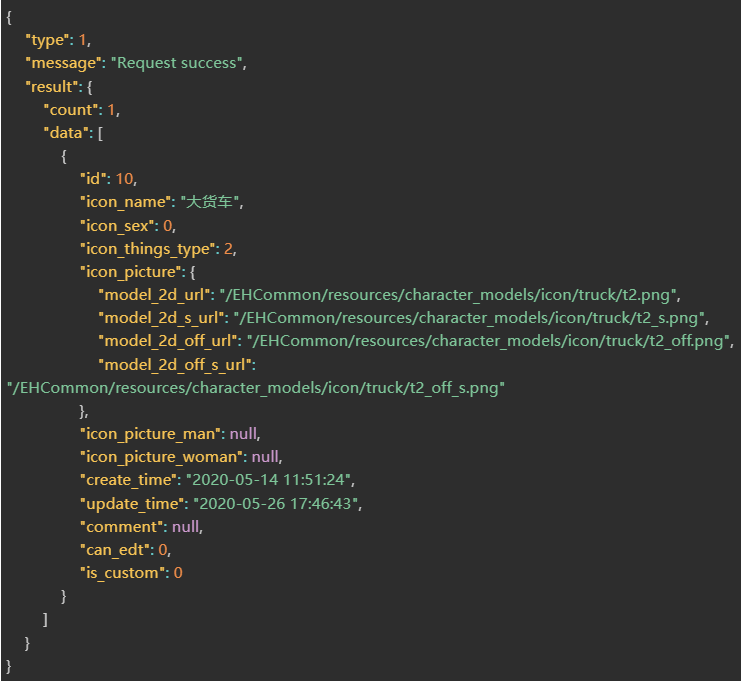
| Field | Type | Description |
| type | Number | Result Type |
| message | String | Result Description |
| result | Object[] | Result |
| count | Object[] | Result Set Count |
| data | Object[] | Result Set |
| id | String | Icon ID |
| icon_name | String | Icon Name |
| icon_sex | Number | Gender (0: Indiscriminate; 1: Differentiated) |
| icon_things_type | Number | Configurable Type (1: Employee; 2: Vehicle; 3: Visitor; 5: Material; 7: Contractor) |
| icon_picture | Object | Icon URL Dictionary |
| model_2d_url | String | Icon (Online) |
| model_2d_s_url | String | Icon (Online – Selected) |
| model_2d_off_url | String | Icon (Offline) |
| model_2d_off_s_url | String | Icon (Offline – Selected) |
| model_2d_alarm_url | String | Alarm Status Icon (Online) |
| model_2d_alarm_s_url | String | Alarm Status Icon (Online – Selected) |
| model_2d_alarm_off_url | String | Alarm Status Icon (Offline) |
| model_2d_alarm_off_s_url | String | Alarm Status Icon (Offline – Selected) |
| icon_picture_man | Object | Icon URL Dictionary (Male) — See icon_picture |
| icon_picture_woman | Object | Icon URL Dictionary (Female) — See icon_picture |
| comment | Number | Remarks |
| can_edt | Number | Editable/Deletable |
| is_custom | Number | Custom Status (Icon Source: 1 = Custom; 0 = System Default) |
Correct Return Example
Personnel Dictionary
1.POST Address
http://ip:port/EHCommon/company/personDict/add
2.Parameter Description
| Field | Required or not | Type | Description |
| name | √ | String | Name |
| type | √ | Number | Type: 1-Text, 2-Image, 3-Time, 4-Date, 5-Single Choice, 6-Multiple Choice |
| type_size | √ | Number | Text Length / Option Length |
| options | √ | Object[] | Character-based Option Array |
| id | √ | Number | Option ID |
| name | √ | String | Option Name |
| sort_num | √ | Number | Option Order |
| is_display | √ | Number | Visibility: 1-Show, 0-Hide |
| is_require | √ | Number | Required: 1-Required, 0-Optional |
3.Success 200
| Field | Type | Description |
| message | String | Interface Request Message |
| type | Number | Interface Request Status |
| result | String | Success Message |
Correct Return Example

1.POST Address
http://ip:port/EHCommon/company/personDict/addOption
2.Parameter Description
| Field | Required or not | Type | Description |
| dict_id | √ | Number | Field Number |
| name | √ | String | Field Name |
3.Success 200
1.POST Address
http://ip:port/EHCommon/company/personDict/checkDictName
2.Parameter Description
| Field | Required or not | Type | Description |
| name | √ | String | Field Name |
| id | String | Dictionary ID |
3.Success 200
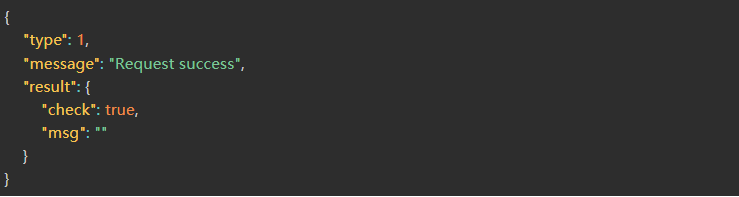
| Field | Type | Description |
| message | String | Interface Request Message |
| type | Number | Interface Request Status |
| result | Object | Request Result |
| check | Boolean | If true, the check was successful; if false, the check failed. |
| msg | String | Reason for Failure |
Correct Return Example
1.POST Address
http://ip:port/EHCommon/company/personDict/checkOption
2.Parameter Description
| Field | Required or not | Type | Description |
| dict_id | √ | Number | Field Index |
| option_id | √ | Number | Option Index |
3.Success 200
1.POST Address
http://ip:port/EHCommon/company/personDict/del
2.Parameter Description
| Field | Required or not | Type | Description |
| id | √ | Number | serial number |
3.Success 200
1.POST Address
http://ip:port/EHCommon/company/personDict/edt
2.Parameter Description
| Field | Required or not | Type | Description |
| id | √ | Number | ID |
| name | √ | String | Name |
| type | √ | Number | Type: 1-Text, 2-Image, 3-Time, 4-Date, 5-Single Choice, 6-Multiple Choice |
| type_size | √ | Number | Specifies length (for Text types) |
| options | √ | Object[] | Specifies options as a character array (for Single/Multiple Choice types) |
| id | √ | Number | Option ID (null when adding a new option) |
| name | √ | String | Option Name |
| sort_num | √ | Number | Option Sort Order Value |
| is_display | √ | Number | Visibility: 1-Visible, 0-Hidden |
| is_require | √ | Number | Required: 1-Required, 0-Optional |
| content_edit | √ | Number | Input Editable: 1-Editable, 0-Non-editable |
3.Success 200
1.POST Address
http://ip:port/EHCommon/company/personDict/edtOption
2.Parameter Description
| Field | Required or not | Type | Description |
| option_id | √ | Number | Option Number |
| dict_id | √ | Number | Field Number |
| name | √ | String | Field Name |
3.Success 200
1.POST Address
http://ip:port/EHCommon/company/personDict/get
2.Parameter Description
| Field | Required or not | Type | Description |
| is_display | √ | Number | Display Status (1: Show, 0: Hide) |
| is_require | √ | Number | Required Status (1: Required, 0: Optional) |
| name | √ | String | Name |
3.Success 200
| Field | Type | Description |
| type | Number | Return Type |
| result | Object | Return Content |
| count | Number | Return Count |
| data | Object[] | Return Data List |
| id | Number | Primary Key |
| name | String | Name |
| type | Number | Type: 1-Text, 2-Image, 3-Time, 4-Date, 5-Single Select, 6-Multi-select |
| type_size | Number | Text/Option Length |
| options | Object[] | Option Array |
| id | Number | Option ID |
| name | String | Option Name |
| is_system | Number | Is System Default? |
| is_display | Number | Is Visible? |
| is_require | Number | Is Required? |
| is_sort | Number | Is Sortable? |
| btn_edit | Number | Is Editable? |
| btn_delete | Number | Is Deletable? |
| btn_display | Number | Is Visibility Editable? |
| btn_require | Number | Is Required Status Editable? |
| btn_name | Number | Is Name Editable? |
| btn_type | Number | Is Type Editable? |
| btn_type_size | Number | Is Length Editable? |
| option_system_edit | Number | Are System Options Editable? |
| option_user_edit | Number | Can User Options Be Added? |
| content_edit | Number | Is Content Editable? |
| option_sort | Number | Are Options Sortable? |
| sort_num | Number | Sort Value |
Correct Return Example
[
{
“id”: 62,
“name”: “options”,
“type”: 5,
“deny_type”: null,
“type_size”: -1,
“content_edit”: 0,
“sort_num”: 22,
“is_display”: 0,
“is_require”: 1,
“role_deny”: {
“name”: 0,
“sort”: 0,
“type”: 0,
“delete”: 0,
“display”: 0,
“require”: 0,
“type_data”: 0
},
“update_time”: “2023-01-03 11:25:20”,
“options”: [
{
“id”: 97,
“dict_id”: 62,
“name”: “value1”,
“sort_num”: 1
},
{
“id”: 98,
“dict_id”: 62,
“name”: “value2”,
“sort_num”: 2
}
]
}
]
1.POST Address
http://ip:port/EHCommon/company/personDict/getName
2.Parameter Description
3.Success 200
1.POST Address
http://ip:port/EHCommon/company/personDict/del
2.Parameter Description
| Field | Required or not | Type | Description |
| display | √ | String | Assemble the named groups into a character-based JSON array, arranged in sequential order; all groups must be passed. |
3.Success 200
Person Model
1.POST Address
http://ip:port/EHCommon/characterModel/character/addCharacter
2.Parameter Description
| Field | Required or not | Type | Description |
| model_name | √ | String | Character Model Name |
| model_sex | √ | Number | Character Model Gender [0: Male, 1: Female] |
| model_hat | √ | Number | Character Model Hat Type [1: No Hat, 2: Standard Hat, 3: Hat with Headlamp] |
| model_hat_color | √ | Number | Character Model Hat Color [1: Yellow, 2: Red, 3: White, 4: Orange, 5: Blue] |
| model_clothing | √ | Number | Character Model Clothing Type [1: Casual Wear, 2: Factory Uniform, 3: Hooded Outfit] |
| model_clothing_color | √ | Number | Character Model Clothing Color (Colors vary depending on clothing type) |
| Casual Wear [1: Black, 2: White] | |||
| Factory Uniform [1: Blue, 2: Dark Blue, 3: Gray, 4: Orange] | |||
| Hooded Outfit [1: Blue, 2: White] |
3.Success 200
| Field | Type | Description |
| result | String | Add Result |
Correct Return Example

1.POST Address
http://ip:port/EHCommon/characterModel/character/batchDeleteCharacter
2.Parameter Description
| Field | Required or not | Type | Description |
| model_id_list | √ | Number[] | Character Model ID List |
3.Success 200
| Field | Type | Description |
| result | String | Delete Results |
Correct Return Example

1.POST Address
http://ip:port/EHCommon/characterModel/character/checkName
2.Parameter Description
| Field | Required or not | Type | Description |
| id | Number | Character Model ID | |
| name | √ | String | Character Model Name |
3.Success 200
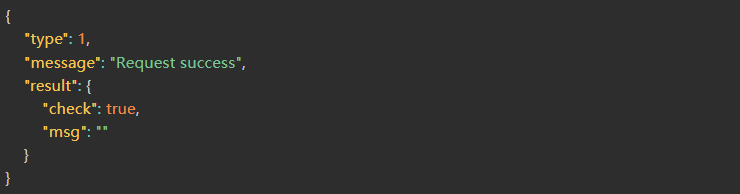
| Field | Type | Description |
| message | String | Interface Request Message |
| type | Number | Interface Request Status |
| result | Object | Request Result |
| check | Boolean | If true, the check was successful; if false, the check failed. |
| msg | String | Reason for Failure |
Correct Return Example
1.POST Address
http://ip:port/EHCommon/characterModel/character/deleteCharacter
2.Parameter Description
| Field | Required or not | Type | Description |
| model_id | √ | Number | Character Model ID |
3.Success 200
| Field | Type | Description |
| result | String | Delete Results |
Correct Return Example

1.POST Address
http://ip:port/EHCommon/characterModel/character/getCharacterDecoration
2.Parameter Description
3.Success 200
| Field | Type | Description |
| result | Object[] | Accessory List |
| decoration_type | Number | Accessory Type [0: Hat, 1: Clothing] |
| decoration_name | String | Accessory Name [Hat, Clothing] |
| default_style_type | Number | Default Style Type |
| decoration_style | Object[] | Accessory Style |
| name | String | Style Name |
| type | String | Style Category |
| color_list | Object[] | Style Color List (Empty list indicates no colors) |
| name | String | Style Color Name |
| type | Number | Style Color Category |
| code | String | Style Color Code [rgb(0,0,0) – rgb(255,255,255)] |
| url | String | Style Color Image URL |
| default_url | String | Default Style Image URL |
| default_color_type | Number | Default Style Image Type |
Correct Return Example
{
“type”: 1,
“message”: “Request success”,
“result”: [
{
“decoration_type”: 0,
“decoration_name”: “帽子”,
“default_style_type”: 1,
“decoration_style”: [
{
“name”: “无帽子”,
“type”: 1,
“color_list”: [],
“default_url”: “/resources/character_models/hats/11.jpg”,
“default_color_type”: 1
},
{
“name”: “普通帽子”,
“type”: 2,
“color_list”: [
{
“name”: “黄色”,
“type”: 1,
“code”: “rgb(230,212,67)”,
“url”: “/resources/character_models/hats/21.jpg”
},
{
“name”: “红色”,
“type”: 2,
“code”: “rgb(252,42,5)”,
“url”: “/resources/character_models/hats/22.jpg”
},
{
“name”: “白色”,
“type”: 3,
“code”: “rgb(255,255,255)”,
“url”: “/resources/character_models/hats/23.jpg”
},
{
“name”: “橙色”,
“type”: 4,
“code”: “rgb(254,128,52)”,
“url”: “/resources/character_models/hats/24.jpg”
},
{
“name”: “蓝色”,
“type”: 5,
“code”: “rgb(3,85,193)”,
“url”: “/resources/character_models/hats/25.jpg”
}
],
“default_url”: “/resources/character_models/hats/21.jpg”,
“default_color_type”: 1
},
{
“name”: “带矿灯的帽子”,
“type”: 3,
“color_list”: [
{
“name”: “黄色”,
“type”: 1,
“code”: “rgb(230,212,67)”,
“url”: “/resources/character_models/hats/31.jpg”
},
{
“name”: “红色”,
“type”: 2,
“code”: “rgb(252,42,5)”,
“url”: “/resources/character_models/hats/32.jpg”
},
{
“name”: “白色”,
“type”: 3,
“code”: “rgb(255,255,255)”,
“url”: “/resources/character_models/hats/33.jpg”
},
{
“name”: “橙色”,
“type”: 4,
“code”: “rgb(254,128,52)”,
“url”: “/resources/character_models/hats/34.jpg”
},
{
“name”: “蓝色”,
“type”: 5,
“code”: “rgb(3,85,193)”,
“url”: “/resources/character_models/hats/35.jpg”
}
],
“default_url”: “/resources/character_models/hats/31.jpg”,
“default_color_type”: 1
}
]
},
{
“decoration_type”: 1,
“decoration_name”: “服装”,
“default_style_type”: 1,
“decoration_style”: [
{
“name”: “日常服”,
“type”: 1,
“color_list”: [
{
“name”: “深色”,
“type”: 1,
“code”: “rgb(63,65,78)”,
“url”: “/resources/character_models/clothings/11.jpg”
},
{
“name”: “浅色”,
“type”: 2,
“code”: “rgb(210,210,194)”,
“url”: “/resources/character_models/clothings/12.jpg”
}
],
“default_url”: “/resources/character_models/clothings/11.jpg”,
“default_color_type”: 1
},
{
“name”: “工厂服”,
“type”: 2,
“color_list”: [
{
“name”: “蓝色”,
“type”: 1,
“code”: “rgb(63,87,214)”,
“url”: “/resources/character_models/clothings/21.jpg”
},
{
“name”: “深蓝色”,
“type”: 2,
“code”: “rgb(57,56,76)”,
“url”: “/resources/character_models/clothings/22.jpg”
},
{
“name”: “灰色”,
“type”: 3,
“code”: “rgb(134,136,160)”,
“url”: “/resources/character_models/clothings/23.jpg”
},
{
“name”: “橙色”,
“type”: 4,
“code”: “rgb(233,78,24)”,
“url”: “/resources/character_models/clothings/24.jpg”
}
],
“default_url”: “/resources/character_models/clothings/21.jpg”,
“default_color_type”: 1
},
{
“name”: “连帽服”,
“type”: 3,
“color_list”: [
{
“name”: “蓝色”,
“type”: 1,
“code”: “rgb(63,87,214)”,
“url”: “/resources/character_models/clothings/31.jpg”
},
{
“name”: “白色”,
“type”: 2,
“code”: “rgb(255,255,255)”,
“url”: “/resources/character_models/clothings/32.jpg”
}
],
“default_url”: “/resources/character_models/clothings/31.jpg”,
“default_color_type”: 1
}
]
}
]
}
1.POST Address
http://ip:port/EHCommon/characterModel/character/getCharacterList
2.Parameter Description
| Field | Required or not | Type | Description |
| model_sex | Number | Character Model Gender [-1: All; 0: Male; 1: Female] | |
| model_name | String | Character Model Name (Fuzzy Search) | |
| page | Number | Page Number | |
| limit | Number | Page Size | |
| model_things_type | Number | Available Types (Default: 1; 1: Employee; 2: Vehicle; 3: Visitor; 5: Material; 7: Contractor) |
3.Success 200
| Field | Type | Description |
| result | Object | Result Set |
| count | Number | Total Number of Character Models |
| data | Object[] | Character Model List |
| model_id | Number | Character Model ID |
| model_name | String | Character Model Name |
| model_sex | Number | Character Model Gender [0: Male, 1: Female] |
| model_things_type | Number | Available Type (Default: 1) [1: Employee, 2: Vehicle, 3: Visitor, 5: Material, 7: Contractor] |
| model_hat | Number | Character Model Hat Category [1: No Hat, 2: Standard Hat, 3: Mining Helmet] |
| model_hat_color | Number | Character Model Hat Color [1: Yellow, 2: Red, 3: White, 4: Orange, 5: Blue] |
| model_clothing | Number | Character Model Clothing Category [1: Casual Wear, 2: Factory Uniform, 3: Hooded Outfit] |
| model_clothing_color | Number | Character Model Clothing Color (Different clothing types have different color options) |
| model_3d_url | String | Character 3D Model URL |
| model_3d_off_url | String | Character 3D Offline Model URL |
| model_2d_url | String | Character 2D Model URL |
| model_2d_s_url | String | Character 2D Selected Model URL |
| model_2d_off_url | String | Character 2D Offline Model URL |
| model_2d_off_s_url | String | Character 2D Offline Selected Model URL |
| hat_url | String | Character Model Hat Image URL |
| clothing_url | String | Character Model Clothing Image URL |
| fullbody_url | String | Character Model Full-Body Image URL |
Correct Return Example
{
“type”: 1,
“message”: “Request success”,
“result”: {
“data”: [
{
“model_id”: 1,
“model_name”: “员工默认模型”,
“model_sex”: 0,
“model_things_type”: 1,
“hat_url”: “/EHCommon/resources/character_models/hats/h11.png”,
“clothing_url”: “/EHCommon/resources/character_models/clothings/c11.png”,
“fullbody_url”: “/EHCommon/resources/character_models/2D/m1111f.png”,
“model_2d_url”: “/EHCommon/resources/character_models/2D/m1111.png”,
“model_2d_s_url”: “/EHCommon/resources/character_models/2D/m1111s.png”,
“model_2d_off_url”: “/EHCommon/resources/character_models/2D/m1010.png”,
“model_2d_off_s_url”: “/EHCommon/resources/character_models/2D/m1010s.png”,
“model_3d_url”: “/EHCommon/resources/character_models/3D/m1111.fbx”,
“model_3d_off_url”: “/EHCommon/resources/character_models/3D/m1010.fbx”,
“model_hat”: 1,
“model_hat_color”: 1,
“model_clothing”: 1,
“model_clothing_color”: 1
},
{
“model_id”: 3,
“model_name”: “访客默认模型”,
“model_sex”: 0,
“model_things_type”: 3,
“hat_url”: “/EHCommon/resources/character_models/hats/h11.png”,
“clothing_url”: “/EHCommon/resources/character_models/clothings/c12.png”,
“fullbody_url”: “/EHCommon/resources/character_models/2D/m1112f.png”,
“model_2d_url”: “/EHCommon/resources/character_models/2D/m1112.png”,
“model_2d_s_url”: “/EHCommon/resources/character_models/2D/m1112s.png”,
“model_2d_off_url”: “/EHCommon/resources/character_models/2D/m1010.png”,
“model_2d_off_s_url”: “/EHCommon/resources/character_models/2D/m1010s.png”,
“model_3d_url”: “/EHCommon/resources/character_models/3D/m1112.fbx”,
“model_3d_off_url”: “/EHCommon/resources/character_models/3D/m1010.fbx”,
“model_hat”: 1,
“model_hat_color”: 1,
“model_clothing”: 1,
“model_clothing_color”: 2
}
],
“count”: 2
}
}
1.POST Address
http://ip:port/EHCommon/characterModel/character/getCharacterUrl
2.Parameter Description
| Field | Required or not | Type | Description |
| model_sex | √ | Number | Character Model Gender [0: Male, 1: Female] |
| model_hat | √ | Number | Character Model Hat Type [1: No Hat, 2: Standard Hat, 3: Hat with Headlamp] |
| model_hat_color | √ | Number | Character Model Hat Color [1: Yellow, 2: Red, 3: White, 4: Orange, 5: Blue] |
| model_clothing | √ | Number | Character Model Clothing Type [1: Casual Wear, 2: Factory Uniform, 3: Hooded Outfit] |
| model_clothing_color | √ | Number | Character Model Clothing Color (Colors vary depending on the clothing type) |
| Casual Wear [1: Black, 2: White] | |||
| Factory Uniform [1: Blue, 2: Dark Blue, 3: Gray, 4: Orange] | |||
| Hooded Outfit [1: Blue, 2: White] |
3.Success 200
| Field | Type | Description |
| result | Object | Result Set |
| model_3d_url | String | Character 3D Model URL |
| model_2d_url | String | Character 2D Model URL |
| hat_url | String | Character Model Hat Image URL |
| clothing_url | String | Character Model Clothing Image URL |
Correct Return Example
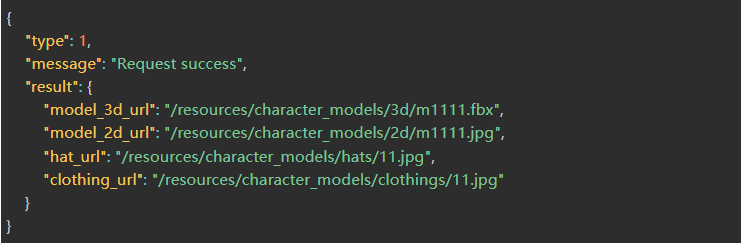
1.POST Address
http://ip:port/EHCommon/characterModel/character/updateCharacter
2.Parameter Description
| Field | Required or not | Type | Description |
| model_id | √ | Number | Character Model ID |
| model_name | String | Character Model Name | |
| model_sex | Number | Character Model Gender [0: Male, 1: Female] | |
| model_hat | Number | Character Model Hat Type [1: No Hat, 2: Standard Hat, 3: Hat with Headlamp] | |
| model_hat_color | Number | Character Model Hat Color [1: Yellow, 2: Red, 3: White, 4: Orange, 5: Blue] | |
| model_clothing | Number | Character Model Clothing Type [1: Casual Wear, 2: Workwear, 3: Hooded Wear] | |
| model_clothing_color | Number | Character Model Clothing Color (Colors vary by clothing type) | |
| Casual Wear [1: Black, 2: White] | |||
| Workwear [1: Blue, 2: Dark Blue, 3: Gray, 4: Orange] | |||
| Hooded Wear [1: Blue, 2: White] |
3.Success 200
| Field | Type | Description |
| result | String | Modification Results |
Correct Return Example

Health
1.POST Address
http://ip:port/EHCommon/health/heartRate/getBodyTemperaturePressureHistory
2.Parameter Description
| Field | Required or not | Type | Description |
| uuid | √ | Number | Array of Card Numbers |
| begin | √ | Number | Start Timestamp (Default interval is 3 hours) |
| end | √ | Number | End Timestamp |
3.Success 200
| Field | Type | Description |
| message | String | Interface Request Message |
| type | Number | Interface Request Status |
| result | Object[] | Historical Body Temperature List |
| id | Number | Primary Key ID |
| card_id | Number | Card Number |
| uuid | Number | Personnel UUID |
| body_temperature_pressure | Number | Body Temperature |
| pressure_time | Number | Body Temperature Update Timestamp |
Correct Return Example
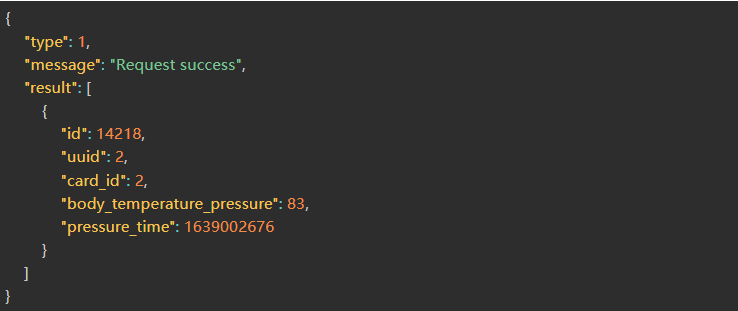
1.POST Address
http://ip:port/EHCommon/health/heartRate/getHealthHistory
2.Parameter Description
| Field | Required or not | Type | Description |
| uuid | √ | Number | Object UUID |
| start_time | √ | Number | Start Time |
| end_time | √ | Number | End Time |
| health_type | √ | Number | 1: Heart Rate | 2: Body Temperature | 3: Blood Oxygen | 4: Diastolic Pressure | 5: Systolic Pressure |
| interval | √ | Number | Time Interval (in seconds; must be a multiple of 5 minutes) |
3.Success 200
| Field | Type | Description |
| type | Number | Response Code |
| message | String | Response Message |
| result | Object | Response Result |
| data | Object[] | Response Result Data |
| start_time | String | Interval Start Time |
| end_time | String | Interval End Time |
| max_num | Number | Maximum Value |
| max_time | String | Time of Maximum Value |
| min_num | Number | Minimum Value |
| min_time | String | Time of Minimum Value |
| mean | Number | Average Value |
Correct Return Example
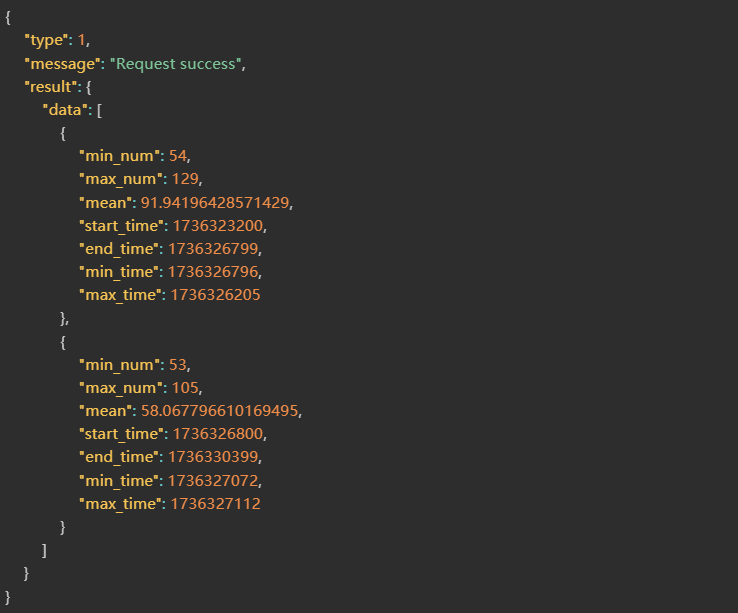
1.POST Address
http://ip:port/EHCommon/health/abnormal/getHeartAbnormal
2.Parameter Description
| Field | Required or not | Type | Description |
| page | Number | Page Number | |
| limit | Number | Items Per Page | |
| id_list | Number[] | ID Array | |
| person_name | String | Employee Name (Fuzzy Search) | |
| visitor_name | String | Visitor Name (Fuzzy Search) | |
| card_id | Number | Card Number (Fuzzy Search) | |
| utype | Number | [Personnel: 1-Employee, 3-Visitor, 6-Contractor] | |
| health_type_code | String | Monitoring Type: 1-Heart Rate, 2-Body Temperature, 3-Blood Oxygen, 4-Blood Pressure | |
| alarm_status | Number | Alarm Status: [1-Active, 2-Resolved] | |
| state | Number | Processing Status: [0-Unprocessed, 1-Processed] | |
| uuid | Number | UUID | |
| homepage_start_time | Number | Start Timestamp | |
| homepage_stop_time | Number | End Timestamp | |
| field | String | Sort Field: [start_time/end_time/duration_time/operation_time] | |
| order | String | Sort Order: [asc/desc] | |
| begin | Number | Start Timestamp | |
| end | Number | End Timestamp | |
| time_type | Number | Time Type: 1-Alarm Duration, 2-Alarm Start Time, 3-Alarm End Time | |
| work_type_id | Number | Employee Job Type ID / Contractor Job Type ID | |
| duty_name | Number | Job Title ID | |
| degree | Number | Education Level | |
| sex | Number | Gender: Employee / Visitor / Contractor | |
| person_class | Number | Employee Category | |
| nation | Number | Ethnicity: Employee / Contractor | |
| branch_id | Number | Department / Visitor | |
| source | Number | Data Source / Contractor | |
| unit_id | Number | Contractor Company / Vehicle | |
| type | Number | Vehicle Type / Material Type |
3.Success 200
| Field | Type | Description |
| result | Object | Results |
| count | Number | Total Count |
| data | Object[] | Data List |
| id | String | Alert ID |
| card_id | String | Card Number |
| uuid | String | UUID |
| utype | String | 1: Employee | 3: Visitor | 6: Contractor |
| person_name | String | Name |
| start_time | String | Alert Start Time |
| end_time | String | Alert End Time |
| related_info | String | Location Target Info [Department Name – Personnel Category, Unit, Unit – Job Type] |
| health_type | String | Monitoring Type: 1: Heart Rate | 2: Body Temperature | 3: Blood Oxygen | 4: Blood Pressure |
| alarm_status | String | Monitoring Status [1: Active | 2: Ended] |
| unit | String | Monitoring Unit |
| alarm_info | String | Alert Details |
| duration_time | String | Duration |
| threshold | String | Abnormal Range |
| max_num | Number | Maximum Value |
| max_time | String | Time of Maximum Value |
| min_num | Number | Minimum Value |
| min_time | String | Time of Minimum Value |
| mean | Number | Average Value |
| operation_person | String | Handler |
| operation_time | String | Handling Time |
| operation_content | String | Handling Details |
| state | String | Handling Status [0: Unhandled | 1: Handled] |
Correct Return Example
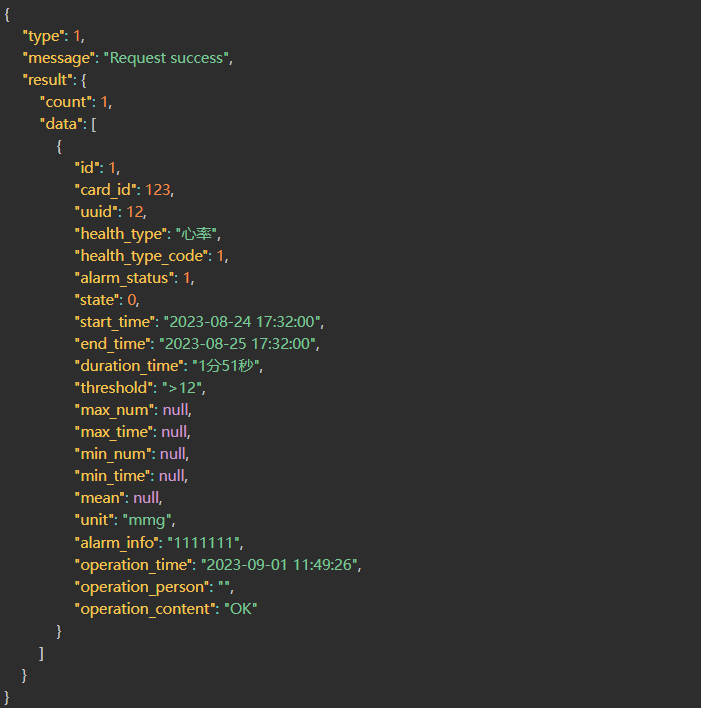
1.POST Address
http://ip:port/EHCommon/health/heartRate/getHeartRate
2.Parameter Description
| Field | Required or not | Type | Description |
| person_name | String | Fuzzy Search: Employee Name | |
| visitor_name | String | Fuzzy Search: Visitor Name | |
| contractor_name | String | Fuzzy Search: Contractor Name | |
| card_id | Number | Fuzzy Search: Card Number | |
| uuid | Number | UUID | |
| utype | Number | [Personnel: 1 | Visitors: 3 | Contractors: 6] | |
| order | String | Sort Order [asc, desc, ASC, DESC] | |
| field | String | Sort Field | |
| [Name, Card Number, Department, Heart Rate, Step Count, Distance, Max Heart Rate, Min Heart Rate, Body Temperature, Blood Oxygen, Timestamp] | |||
| page | Number | Page Number | |
| limit | Number | Items Per Page | |
| work_type_id | Number | Employee Job Type ID / Contractor Job Type ID | |
| duty_name | Number | Job Title ID | |
| degree | Number | Education Level | |
| sex | Number | Employee Gender / Visitor Gender / Contractor Gender | |
| person_class | Number | Employee Category | |
| nation | Number | Employee Ethnicity / Contractor Ethnicity | |
| branch_id | Number | Department / Visitor | |
| source | Number | Data Source / Contractor | |
| unit_id | Number | Contractor Company / Vehicle | |
| type | Number | Vehicle Type / Material Type |
3.Success 200
| Field | Type | Description |
| message | String | Interface Request Message |
| type | Number | Interface Request Status |
| result | Object | Returned Results |
| data | Object[] | Health Information List |
| card_id | Number | Card Number |
| type_name | Number | Card Type Name |
| uuid | Number | Personnel UUID |
| maximum_heart_rate | Number | Maximum Heart Rate Value |
| lower_heart_rate | Number | Minimum Heart Rate Value |
| heart_rate_thresholds | String | Heart Rate Threshold |
| heart_rate | String | Current Heart Rate Value |
| maximum_systolic_blood | Number | Systolic Blood Pressure Upper Limit |
| lower_systolic_blood | Number | Systolic Blood Pressure Lower Limit |
| maximum_diastolic_blood | Number | Diastolic Blood Pressure Upper Limit |
| lower_diastolic_blood | Number | Diastolic Blood Pressure Lower Limit |
| blood_pressure | String | Current Blood Pressure Value |
| heart_rate_status | Number | Current Status [0: Abnormal; 1: Normal] |
| step | Number | Step Count |
| distance | Number | Distance Moved |
| conversion_they_count | Number | Converted Step Count |
| branch_name | String | Department Name |
| name | String | Located Object Name [Employee Name, Visitor Name] |
| sex | Number | Gender |
| age | Number | Age |
| branch_id | Number | Department ID |
| oxygen_pressure | Number | Blood Oxygen Level |
| oxygen_thresholds | Number | Blood Oxygen Threshold |
| body_temperature_thresholds | Float | Body Temperature Threshold |
| body_temperature_pressure | Float | Body Temperature |
| recv_time | String | Timestamp |
| person_photo | String | Personnel Avatar (May be an empty string) |
| person_class_name | String | Personnel Category Name |
| utype | String | Located Object Type [1: Personnel; 2: Vehicle; 3: Visitor; 5: Material; 0: Unregistered Card; 6: Contractor] |
| count | Number | Total Health Records |
| heart_rate_abnormal_count | Number | Total Current Anomalies |
| related_info | String | Located Object Details [Gate Name – Personnel Category; Organization; Vehicle Type – Driver Name; Material Type – Material Name; Contractor Organization – Trade] |
Correct Return Example
{
“type”: 1,
“message”: “Request success”,
“result”: {
“data”: [
{
“card_id”: 1,
“maximum_heart_rate”: 160,
“lower_heart_rate”: 40,
“heart_rate”: 26,
“heart_rate_status”: 0,
“step”: 0,
“distance”: 52225,
“conversion_they_count”: 87041.66666666667,
“branch_name”: “默认公司”,
“name”: “小黑”,
“type_name”: “员工卡”,
“sex”: 0,
“age”: null,
“branch_id”: 1,
“oxygen_pressure”: 86,
“oxygen_thresholds”: 100,
“body_temperature_thresholds”: 36.1,
“body_temperature_pressure”: 36.1,
“uuid”: 25,
“person_photo”: “4_person_photo_1646298949.png”,
“recv_time”: 1681095465,
“custom_a”: “111”,
“custom_b”: “222”,
“custom_c”: “333”,
“unit”: “单位”,
“job_num”: “工号”,
“related_info”: “默认公司-人员分类名称”,
“utype”: 1,
“maximum_systolic_blood”: “111”,
“lower_systolic_blood”: “222”,
“maximum_diastolic_blood”: “333”,
“lower_diastolic_blood”: “111”,
“diastolic_blood”: “99”,
“systolic_blood”: “99”
}
],
“count”: 3,
“heart_rate_abnormal_count”: 1
}
}
1.POST Address
http://ip:port/EHCommon/health/heartRate/getHistory
2.Parameter Description
| Field | Required or not | Type | Description |
| uuid | √ | Number | Personnel UUID |
| begin | √ | Number | Start Timestamp |
| end | √ | Number | End Timestamp |
3.Success 200
| Field | Type | Description |
| message | String | Interface Request Message |
| type | Number | Interface Request Status |
| result | Object[] | Historical Heart Rate List |
| id | Number | Primary Key ID |
| card_id | Number | Card Number |
| uuid | Number | Unique ID |
| heart_rate | Number | Heart Rate Value |
| time | Number | Timestamp |
Correct Return Example
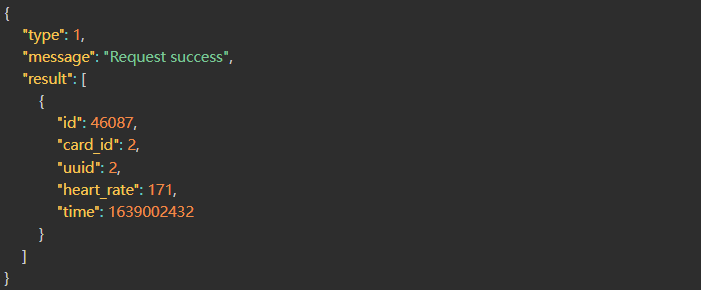
1.POST Address
http://ip:port/EHCommon/health/heartRate/getOxygenPressureHistory
2.Parameter Description
| Field | Required or not | Type | Description |
| uuid | √ | Number | Array of Card Numbers |
| begin | √ | Number | Start Timestamp (Default interval is 3 hours) |
| end | √ | Number | End Timestamp |
3.Success 200
| Field | Type | Description |
| message | String | Interface Request Message |
| type | Number | Interface Request Status |
| result | Object[] | Historical Blood Oxygen List |
| id | Number | Primary Key ID |
| card_id | Number | Card Number |
| uuid | Number | Personnel UUID |
| oxygen_pressure | Number | Blood Oxygen Level |
| pressure_time | Number | Blood Oxygen Update Timestamp |
Correct Return Example
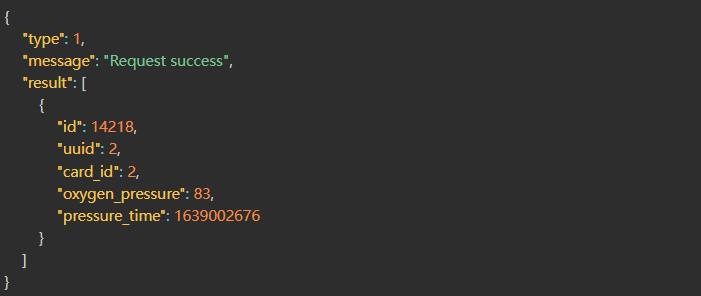
1.POST Address
http://ip:port/EHCommon/health/heartRate/updateHeartRate
2.Parameter Description
| Field | Required or not | Type | Description |
| uuid_list | √ | Number[] | List of User UUIDs |
| maximum_heart_rate | Number | Maximum Heart Rate | |
| lower_heart_rate | Number | Minimum Heart Rate | |
| maximum_systolic_blood | Number | Systolic Blood Pressure Upper Limit | |
| lower_systolic_blood | Number | Systolic Blood Pressure Lower Limit | |
| maximum_diastolic_blood | Number | Diastolic Blood Pressure Upper Limit | |
| lower_diastolic_blood | Number | Diastolic Blood Pressure Lower Limit | |
| oxygen_thresholds | Number | Blood Oxygen Lower Limit | |
| body_temperature_thresholds | Float | Body Temperature Upper Limit |
3.Success 200
| Field | Type | Description |
| message | String | Interface Request Message |
| type | Number | Interface Request Status |
| result | String | Set Successfully |
Correct Return Example

Zone
1.POST Address
http://ip:port/EHCommon/area/area/addArea
2.Parameter Description
| Field | Required or not | Type | Description |
| name | √ | String | Region Name |
| type | √ | Number | Region Type [1: Standard, 2: Attendance Zone, 3: Electronic Roll-Call Zone, 9: Primary Zone, 10: Secondary Zone, 11: Camera Zone, 12: Inspection Point Zone, 13: Obstacle Zone, 14: Activity Zone, 15: Blind Spot] |
| floor_id | √ | Number | Floor ID |
| is_use | √ | Number | Region Enabled Status |
| area | √ | String | Region Coordinates: A string concatenating the X/Y coordinates of the points in clockwise order; X and Y values are separated by a comma, and points are separated by a space. The string includes the closing point; format example: “x1,y1 x2,y2 x3,y3 x1,y1” |
| is_gps | √ | Number | Is GPS Region? [0: UWB Region, 1: GPS Region] |
| alarm_rule_list | Number[] | List of Alarm Rule IDs | |
| area_group_list | Number[] | List of Region Groups | |
| area_template_id | √ | Number | Region Template ID |
| area_rule_group_list | Number[] | Rule Group Bound to Region | |
| is_show | √ | Number | Visibility Attribute [1: Visible, 0: Hidden] |
| area_type_option_id | √ | Number | Electronic Fence Region Dictionary: Region Type Option ID |
| area_dict | Object[] | Custom Dictionary-Related Content | |
| shape | Number | Region Shape [1: Non-Circular, 2: Circular] | |
| circle_attribute | String | Circular Region Attributes (JSON String): {“radius”: 1, “center”: {“x”: 1, “y”: 2}} |
3.Success 200
| Field | Type | Description |
| result | Number | Region ID |
| type | Number | Interface Response Status [0: Login Invalid; 1: Success; 100: Program Exception; 101: Parameter Error; 102: Data Retrieval Failed; 103: Dongle Authentication Failed; 104: Request Header ‘sn’ Missing or Misconfigured; 105: No Reservation Permissions] |
| message | String | Interface Response Status Description Message |
Correct Return Example

1.POST Address
http://ip:port/EHCommon/area/AreaDict/addAreaDict
2.Parameter Description
| Field | Required or not | Type | Description |
| name | √ | String | Field Name |
| btn_name | √ | Number | Editable Field Name: 1 (Yes) | 0 (No) |
| type | √ | Number | Type: 1 (Text) | 2 (Image) | 3 (Time) | 4 (Date) | 5 (Single Choice) | 6 (Multiple Choice) |
| sort_key | √ | Number | Sort Order |
| is_display | √ | Number | Visible: 1 (Yes) | 0 (No) |
| btn_display | √ | Number | Editable Visibility: 1 (Yes) | 0 (No) |
| is_require | √ | Number | Required: 1 (Yes) | 0 (No) |
| btn_require | √ | Number | Editable Required Status: 1 (Yes) | 0 (No) |
| btn_type | √ | Number | Changeable Type: 1 (Yes) | 0 (No) |
| type_size | √ | Number | Text Length (-1 for Unlimited) |
| options | √ | String[] | Option Details |
3.Success 200
| Field | Type | Description |
| result | String | result |
Correct Return Example

1.POST Address
http://ip:port/EHCommon/area/AreaDict/addAreaType
2.Parameter Description
| Field | Required or not | Type | Description |
| name | √ | String | Electronic Fence Type Name |
3.Success 200
Correct Return Example

1.POST Address
http://ip:port/EHCommon/area/Area/area
2.Parameter Description
| Field | Required or not | Type | Description |
| type_id_list | Number[] | Region Type |
3.Success 200
| Field | Type | Description |
| result | Object | Region Group List |
| name | String | Group Name |
| id | Number | Group ID |
| rel_area | Object[] | Associated Region |
| id | Number | Associated Region ID |
| name | String | Associated Region Name |
| type | Number | API Response Status [0: Login Invalid; 1: Success; 100: Program Exception; 101: Parameter Error; 102: Data Retrieval Failed; 103: Dongle Authentication Failed; 104: Request Header SN Missing or Invalid; 105: No Reservation Permissions] |
| message | String | API Response Status Description Message |
Correct Return Example
{
“type”: 1,
“message”: “Request success”,
“result”: [
{
“id”: 2,
“name”: “分组BBBBBB”,
“rel_area”: [
{
“id”: 4,
“name”: “办公区域”
}
]
},
{
“id”: 1,
“name”: “测试分组AAA”,
“rel_area”: [
{
“id”: 13,
“name”: “基站所在区域测试”
},
{
“id”: 11,
“name”: “基站所在区域”
}
]
},
{
“id”: -1,
“name”: “未分组”,
“rel_area”: [
{
“id”: 40,
“name”: “十楼办公区域”
},
{
“id”: 39,
“name”: “全区域测试”
},
{
“id”: 36,
“name”: “十楼告警测试区域”
},
{
“id”: 12,
“name”: “角落基站”
}
]
}
]
}
1.POST Address
http://ip:port/EHCommon/area/Area/areaTypeQuery
2.Parameter Description
3.Success 200
| Field | Type | Description |
| result | Object[] | Region Group List |
| name | String | Region Category Type Name |
| id | Number | Region Category ID |
| rel_area | Object[] | Associated Region or Group Data |
| id | Number | Associated Region ID or Group ID |
| name | String | Associated Region Name or Group Name |
| rel_area | Object[] | Associated Region Data |
| id | Number | Region ID |
| name | String | Region Name |
| type | Number | API Response Status [0: Login Invalid; 1: Success; 100: Program Exception; 101: Parameter Error; 102: Data Retrieval Failed; 103: Dongle Authentication Failed; 104: Request Header ‘sn’ Missing or Invalid; 105: No Reservation Permissions] |
| message | String | API Response Status Message |
Correct Return Example
{
“type”: 1,
“message”: “Request success”,
“result”: [
{
“id”: 1,
“name”: “电子围栏区域”,
“rel_area”: [
{
“id”: 1,
“name”: “S”,
“rel_area”: [
{
“id”: 6,
“name”: “最终”
},
{
“id”: 14,
“name”: “fxxxx”
},
{
“id”: 24,
“name”: “室外”
}
]
},
{
“id”: 2,
“name”: “SS”,
“rel_area”: []
},
{
“id”: 3,
“name”: “SSS”,
“rel_area”: [
{
“id”: 13,
“name”: “全”
}
]
},
{
“id”: -1,
“name”: “未分组”,
“rel_area”: [
{
“id”: 27,
“name”: “3333”
},
{
“id”: 26,
“name”: “2222”
},
{
“id”: 25,
“name”: “sssssssssssss”
},
{
“id”: 23,
“name”: “ss”
},
{
“id”: 22,
“name”: “33”
},
{
“id”: 21,
“name”: “2”
},
{
“id”: 20,
“name”: “1”
},
{
“id”: 19,
“name”: “陈鑫博用测试上下井”
},
{
“id”: 18,
“name”: “fs”
},
{
“id”: 17,
“name”: “123会议室”
},
{
“id”: 16,
“name”: “eq门”
},
{
“id”: 5,
“name”: “限制”
},
{
“id”: 2,
“name”: “testf”
}
]
}
]
},
{
“id”: 2,
“name”: “考勤区域”,
“rel_area”: [
{
“id”: 23,
“name”: “ss”
}
]
},
{
“id”: 3,
“name”: “点名区域”,
“rel_area”: [
{
“id”: 22,
“name”: “33”
}
]
},
{
“id”: 9,
“name”: “上下井”,
“rel_area”: [
{
“id”: 19,
“name”: “陈鑫博用测试上下井”
}
]
}
]
}
1.POST Address
http://ip:port/EHCommon/area/area/batchDeleteAreaList
2.Parameter Description
| Field | Required or not | Type | Description |
| id_list | √ | Number[] | Electronic Fence ID List |
3.Success 200
| Field | Type | Description |
| message | String | Interface Request Message |
| type | Number | Interface Request Status |
| result | String | Deletion Success Message |
Correct Return Example

1.POST Address
http://ip:port/EHCommon/area/Area/checkAreaNameRepeat
2.Parameter Description
| Field | Required or not | Type | Description |
| id | Number | Electronic Fence ID | |
| name | √ | String | Electronic Fence Type Name |
3.Success 200
| Field | Type | Description |
| result | Object | Request Result |
| check | Boolean | If `true`, the check was successful; if `false`, the check failed. |
| msg | String | Reason for Failure |
| type | Number | Interface Response Status [0: Login Invalid; 1: Normal Return; 100: Program Exception; 101: Parameter Error; 102: Data Retrieval Failed; 103: Dongle Authentication Failed; 104: Request Header ‘sn’ Missing or Misconfigured; 105: No Reservation Permissions] |
| message | String | Interface Response Status Description Message |
Correct Return Example
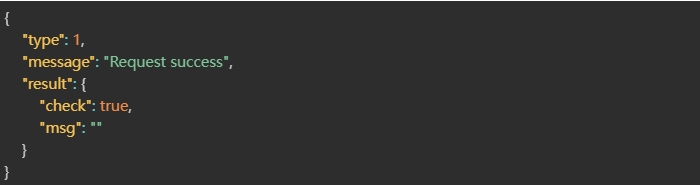
1.POST Address
http://ip:port/EHCommon/area/AreaDict/checkAreaTypeName
2.Parameter Description
| Field | Required or not | Type | Description |
| id | Number | Electronic Fence Type ID | |
| name | √ | String | Electronic Fence Type Name |
3.Success 200
| Field | Type | Description |
| message | String | Interface Request Message |
| type | Number | Interface Request Status |
| result | Object | Request Result |
| check | Boolean | If true, the check was successful; if false, the check failed. |
| msg | String | Reason for Failure |
Correct Return Example
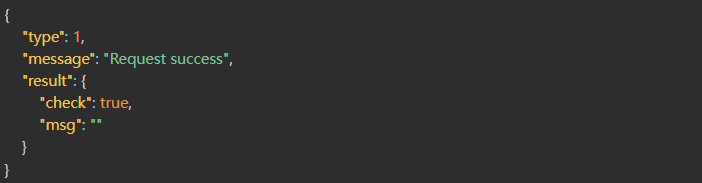
1.POST Address
http://ip:port/EHCommon/area/AreaDict/checkDictName
2.Parameter Description
| Field | Required or not | Type | Description |
| id | Number | Dictionary ID | |
| name | √ | String | Region Dictionary Field Name |
3.Success 200
| Field | Type | Description |
| message | String | Interface Request Message |
| type | Number | Interface Request Status |
| result | Object | Request Result |
| check | Boolean | If true, the check was successful; if false, the check failed. |
| msg | String | Reason for Failure |
Correct Return Example
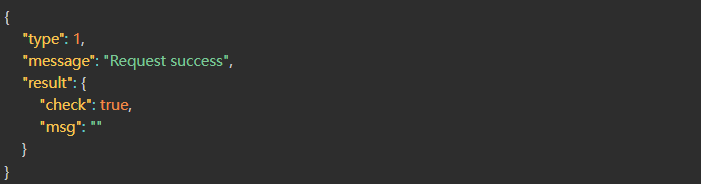
1.POST Address
http://ip:port/EHCommon/area/Area/checkNameDeny
2.Parameter Description
| Field | Required or not | Type | Description |
| name | √ | String | name |
3.Success 200
| Field | Type | Description |
| result | Object | Request Result |
| check | Boolean | If `true`, the check was successful; if `false`, the check failed. |
| msg | String | Reason for Failure |
| type | Number | Interface Response Status [0: Login Invalid; 1: Normal Return; 100: Program Exception; 101: Parameter Error; 102: Data Retrieval Failed; 103: Dongle Authentication Failed; 104: Request Header ‘sn’ Missing or Misconfigured; 105: No Reservation Permissions] |
| message | String | Interface Response Status Description Message |
Correct Return Example
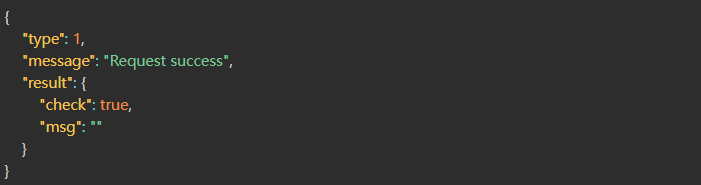
1.POST Address
http://ip:port/EHCommon/area/AreaDict/delAreaDict
2.Parameter Description
| Field | Required or not | Type | Description |
| id | √ | Number | id |
3.Success 200
| Field | Type | Description |
| result | String | result |
Correct Return Example

1.POST Address
http://ip:port/EHCommon/area/area/deleteArea
2.Parameter Description
| Field | Required or not | Type | Description |
| id | √ | Number | Region ID |
3.Success 200
| Field | Type | Description |
| message | String | Interface Request Message |
| type | Number | Interface Request Status |
| result | String | Deletion Success Message |
Correct Return Example

1.POST Address
http://ip:port/EHCommon/area/AreaDict/deleteAreaType
2.Parameter Description
| Field | Required or not | Type | Description |
| id | √ | Number | Electronic Fence Type ID |
3.Success 200
Correct Return Example

1.POST Address
http://ip:port/EHCommon/area/AreaDict/deleteRule
2.Parameter Description
3.Success 200
| Field | Type | Description |
| id | Number | Option ID |
Correct Return Example

1.POST Address
http://ip:port/EHCommon/area/AreaDict/editAreaDict
2.Parameter Description
| Field | Required or not | Type | Description |
| id | √ | Number | ID |
| name | √ | String | Field Name |
| btn_name | √ | Number | Editable Field Name: 1 (Yes) / 0 (No) |
| type | √ | Number | Type: 1 (Text) / 2 (Image) / 3 (Time) / 4 (Date) / 5 (Single Choice) / 6 (Multiple Choice) |
| is_display | √ | Number | Visible: 1 (Yes) / 0 (No) |
| btn_display | √ | Number | Editable Visibility: 1 (Yes) / 0 (No) |
| is_require | √ | Number | Required: 1 (Yes) / 0 (No) |
| btn_require | √ | Number | Editable Required Status: 1 (Yes) / 0 (No) |
| btn_type | √ | Number | Changeable Type: 1 (Yes) / 0 (No) |
| type_size | √ | Number | Text Length (-1 for Unlimited) |
| options | √ | Object[] | Option Information |
| id | √ | Number | Option ID (Leave blank for new options) |
| name | √ | String | Option Name |
| sort_key | √ | Number | Sort Order |
3.Success 200
| Field | Type | Description |
| result | String | result |
Correct Return Example

1.POST Address
http://ip:port/EHCommon/area/area/exportAreaList
2.Parameter Description
| Field | Required or not | Type | Description |
| scene_id | Number | Scene ID | |
| building_id | Number | Building ID | |
| floor_id | Number | Floor ID | |
| is_use | Number | Enabled Status [1: Enabled, 0: Disabled] | |
| area_template_id | Number | Associated Zone Template ID | |
| area_group_id | Number | Geofence Group ID | |
| area_name | String | Geofence Name | |
| area_type_id | Number | Geofence Type ID | |
| id_list | Number | Geofence ID List |
1.POST Address
http://ip:port/EHCommon/area/area/getArea
2.Parameter Description
| Field | Required or not | Type | Description |
| id | Number | Area ID | |
| name | String | Area Name (Fuzzy Search) | |
| area_group_id | Number | Group ID | |
| template_id | Number | Template ID | |
| type | Number | Area Type [1: Standard; 7: Signal Fence; 8: Blind Spot; 2: Attendance Zone; 3: Electronic Roll Call Zone] | |
| floor_id_list | Number[] | Floor List | |
| scene_id | Number | Scene ID | |
| building_id | Number | Building ID | |
| floor_id | Number | Floor ID | |
| is_use | Number | Area Enabled Status | |
| is_gps | Number | Is GPS Area? [0: UWB Area; 1: GPS Area] | |
| is_show | Number | Attribute 1 Display Status [0: Hidden] | |
| order | String | Sort Order | |
| field | String | Sort Field | |
| page | Number | Page Number | |
| limit | Number | Page Size |
3.Success 200
| Field | Type | Description |
| message | String | Interface Request Message |
| type | Number | Interface Request Status |
| result | Object | Result Set |
| count | Number | Total Count |
| data | Object[] | Data List |
| id | Number | Area ID |
| name | String | Area Name |
| type | Number | Area Type |
| is_use | Number | Area Enabled Status |
| is_show | Number | Attribute 1: Display; 0: Do Not Display |
| floor_id | Number | Floor ID |
| is_gps | Number | GPS Status [0: UWB; 1: GPS] |
| branch_id | Number | Department ID |
| area | String | Actual Area Coordinate String |
| is_del | Number | Area Deletion Status |
| start | Float | Floor Start Height |
| height | Float | Floor End Height |
| area_type_option_id | Number | Electronic Fence Area Type ID |
| is_security_area | Number | Safety Zone Status [1: Safety Zone; 0: Not a Safety Zone] |
| alarm_rule_ids | Number[] | List of Alarm Rule IDs (Roll Call, Inspection, and General Alarms Only) |
| alarm_rule_info | Object[] | List of Alarm Rules (Includes Name, Type, Group, Object, Date, Status) |
| id | Number | Alarm Rule ID |
| name | String | Alarm Rule Name |
| type | Number | Alarm Rule Type |
| is_use | Number | Alarm Rule Status [0: Disabled; 1: Enabled] |
| start_time | Number | Valid Start Timestamp |
| end_time | Number | Valid End Timestamp |
| apply_label | String | Applicable Objects |
| group | Object[] | Rule Group |
| area_dict | Object[] | Area Custom Dictionary Content |
| area_template | Object | Area Template |
| id | Number | Area Template ID |
| name | String | Area Template Name |
| area_style | String | Area Template Color |
| relative_start | Float | Area Template Relative Start Height |
| relative_end | Float | Area Template Relative End Height |
| disappear_time | Number | Timestamp for Tag Disappearance within Area [0: Follow System Time] |
| offline_time | Number | Tag Offline Timeout [0: Follow System Time] |
| uwb_area_entry_exit_detection_time | Number | Tag Entry/Exit Determination Time (Seconds) |
| uwb_area_entry_exit_effective_points | Number | Tag Entry/Exit Determination Point Count |
| bluetooth_area_entry_exit_detection_time | Number | Tag Entry/Exit Determination Time (Seconds) [Bluetooth Tags] |
| bluetooth_area_entry_exit_effective_points | Number | Tag Entry/Exit Determination Point Count [Bluetooth Tags] |
| area_group | Object[] | Area Group |
| id | Number | Area Group ID |
| name | String | Area Group Name |
| floor_name | String | Floor Name |
| building_id | Number | Building ID |
| building_name | String | Building Name |
| scene_id | Number | Scene ID |
| scene_name | String | Scene Name |
Correct Return Example
{
“type”: 1,
“message”: “Request success”,
“result”: {
“data”: [
{
“id”: 44,
“name”: “报警”,
“type”: 1,
“is_use”: 1,
“floor_id”: 3,
“is_gps”: 0,
“branch_id”: 0,
“area”: “8.737716788584676,18.659896088086192 25,18.659896088086192 25,24.371314588610076 8.737716788584676,24.371314588610076 8.737716788584676,18.659896088086192”,
“is_del”: 0,
“floor_name”: “楼层2”,
“start”: 0,
“height”: 10,
“building_id”: 1,
“building_name”: “建筑1”,
“scene_id”: 1,
“scene_name”: “场景1”,
“area_template”: {
“id”: 1,
“name”: “基础模板”,
“area_style”: “rgba(0, 50, 250, 0.43)”,
“relative_start”: 0,
“relative_end”: 10,
“disappear_time”: 0,
“offline_time”: 0
},
“area_group”: [
{
“id”: 2,
“name”: “分组1”
}
],
“alarm_rule_ids”: [
1,
36,
37,
39,
40,
41,
42,
43,
44,
45
],
“is_security_area”: 0,
“alarm_rule_info”: [
{
“id”: 45,
“name”: “88822”,
“type”: 1,
“card_all”: 0,
“is_use”: 1,
“data”: 0,
“branch_id”: 0,
“start_time”: 0,
“end_time”: 0,
“day_json”: null,
“time_json”: null,
“special_json”: null,
“branch_id_json”: null,
“comment”: ” “,
“is_truck”: 0,
“is_visitor”: 0,
“is_person”: 0,
“apply_label_type”: 1,
“message”: “”,
“message_turn”: 0,
“uuids”: [
{
“card_id”: 963258,
“uuid”: 5,
“utype”: 1,
“name”: “电子点名人”,
“person_name”: “电子点名人”,
“branch_name”: “部门1”,
“branch_id”: 2,
“driver”: null,
“truck_type”: null,
“licence”: null,
“company_name”: null,
“visitor_name”: null
}
],
“branch_ids”: [
{
“id”: 1,
“branch_name”: “默认公司”,
“top_name”: “默认公司”
}
],
“truck_type_ids”: [
{
“id”: 1,
“name”: “默认车辆”,
“icon”: 1
}
],
“area_ids”: [
44
],
“area_info”: [
{
“id”: 44,
“name”: “报警”,
“floor_name”: “楼层2”,
“building_name”: “建筑1”,
“is_use”: 1,
“scene_name”: “场景1”
}
],
“dynamic_area_ids”: [
1,
2,
3
],
“apply_label”: “无作用标签”
}
],
“alarm_rule_group_info”: [
{
“id”: 1,
“name”: “2131”,
“alarm_rule_list”: [
{
“id”: 45,
“name”: “88822”,
“type”: 1,
“card_all”: 0,
“is_use”: 1,
“data”: 0,
“branch_id”: 0,
“start_time”: 0,
“end_time”: 0,
“day_json”: null,
“time_json”: null,
“special_json”: null,
“branch_id_json”: null,
“comment”: ” “,
“is_truck”: 0,
“is_visitor”: 0,
“is_person”: 0,
“apply_label_type”: 1,
“message”: “”,
“message_turn”: 0,
“uuids”: [
{
“card_id”: 963258,
“uuid”: 5,
“utype”: 1,
“name”: “电子点名人”,
“person_name”: “电子点名人”,
“branch_name”: “部门1”,
“branch_id”: 2,
“driver”: null,
“truck_type”: null,
“licence”: null,
“company_name”: null,
“visitor_name”: null
}
],
“branch_ids”: [
{
“id”: 1,
“branch_name”: “默认公司”,
“top_name”: “默认公司”
}
],
“truck_type_ids”: [
{
“id”: 1,
“name”: “默认车辆”,
“icon”: 1
}
],
“area_ids”: [
44
],
“area_info”: [
{
“id”: 44,
“name”: “报警”,
“floor_name”: “楼层2”,
“building_name”: “建筑1”,
“is_use”: 1,
“scene_name”: “场景1”
}
],
“dynamic_area_ids”: [
1,
2,
3
],
“apply_label”: “无作用标签”
}
]
}
]
}
],
“area_type_option_id”: 1,
“count”: 1
}
}
1.POST Address
http://ip:port/EHCommon/area/AreaDict/getAreaDict
2.Parameter Description
| Field | Required or not | Type | Description |
| is_display | Number | Display Status (1: Show; 0: Hide) | |
| is_require | Number | Required Field (1: Yes; 0: No) | |
| name | String | Field Name |
3.Success 200
| Field | Type | Description |
| id | Number | ID |
| name | String | Field Name |
| btn_name | Number | Is Field Name Editable? (1: Yes, 0: No) |
| type | Number | Type (1: Text, 2: Image, 3: Time, 4: Date, 5: Single Select, 6: Multi-select, 7: Attachment) |
| sort_key | Number | Sort Order |
| is_display | Number | Is Displayed? (1: Yes, 0: No) |
| btn_display | Number | Is Display Visibility Editable? (1: Yes, 0: No) |
| is_require | Number | Is Required? (1: Yes, 0: No) |
| btn_require | Number | Is Required Status Editable? (1: Yes, 0: No) |
| btn_type | Number | Is Type Changeable? (1: Yes, 0: No) |
| btn_delete | Number | Is Deletable? (1: Yes, 0: No) |
| type_size | Number | Text Length (-1 for Unlimited) |
| btn_edit | Number | Is Field Editable? [1: Yes, 0: No] |
| is_sort | Number | Is Field Sortable? [1: Yes, 0: No] |
| field | Number | Field Logical Name [Value indicates a system field; NULL indicates a user-added field] |
| option_length | Number | Option Length |
| option_system_edit | Number | Are Default Options Editable/Deletable? (1: Yes, 0: No) |
| option_user_edit | Number | Are Custom Options Addable/Editable/Deletable? (1: Yes, 0: No) |
| option_sort | Number | Are All Options Sortable? (1: Yes, 0: No) |
| options | Object[] | Option Information |
| id | Number | Option ID |
| sort_key | Number | Sort Order |
| name | String | Option Name |
| is_system | String | Is Default Option? (0: No, 1: Yes) |
| btn_delete | Number[] | Is Deletable? (1: Yes, 0: No) |
| btn_name | Number[] | Is Field Name Editable? (1: Yes, 0: No) |
| area_rule | Object[] | Region Type Rules |
| sort_key | Number | Sort Order |
| id | Number | Region Type Rule ID |
| name | String | Region Type Rule Name |
| name_type | Number[] | Region Type Rule Type |
Correct Return Example
{
“type”: 1,
“message”: “Request success”,
“result”: [
{
“id”: 1,
“name”: “电子围栏名称”,
“btn_name”: 0,
“type”: 1,
“sort_key”: 1,
“is_display”: 1,
“btn_display”: 0,
“is_require”: 1,
“btn_require”: 0,
“btn_type”: 0,
“btn_delete”: 0,
“type_size”: 20,
“btn_edit”: 1,
“is_sort”: 0
},
{
“id”: 2,
“name”: “电子围栏类型”,
“btn_name”: 0,
“type”: 5,
“sort_key”: 2,
“is_display”: 1,
“btn_display”: 1,
“is_require”: 0,
“btn_require”: 1,
“btn_type”: 0,
“btn_delete”: 0,
“type_size”: -1,
“btn_edit”: 0,
“is_sort”: 1,
“option”: [
{
“id”: 1,
“name”: “井口区域”,
“btn_delete”: 0,
“btn_name”: 0,
“sort_key”: 2
},
{
“id”: 2,
“name”: “重点区域”,
“btn_delete”: 0,
“btn_name”: 0,
“sort_key”: 3
},
{
“id”: 3,
“name”: “限制区域”,
“btn_delete”: 0,
“btn_name”: 0,
“sort_key”: 4
},
{
“id”: 4,
“name”: “其他区域”,
“btn_delete”: 0,
“btn_name”: 0,
“sort_key”: 4
},
{
“id”: 5,
“name”: “默认区域”,
“btn_delete”: 0,
“btn_name”: 0,
“sort_key”: 5
},
{
“id”: 6,
“name”: “aaa”,
“btn_delete”: 1,
“btn_name”: 1,
“sort_key”: 7
},
{
“id”: 11,
“name”: “test”,
“btn_delete”: 1,
“btn_name”: 1,
“sort_key”: 7
},
{
“id”: 12,
“name”: “fuck”,
“btn_delete”: 1,
“btn_name”: 1,
“sort_key”: 7
},
{
“id”: 13,
“name”: “ff”,
“btn_delete”: 1,
“btn_name”: 1,
“sort_key”: 7
},
{
“id”: 19,
“name”: “地方”,
“btn_delete”: 1,
“btn_name”: 1,
“sort_key”: 7
},
{
“id”: 21,
“name”: “asdfassadf”,
“btn_delete”: 1,
“btn_name”: 1,
“sort_key”: 7
},
{
“id”: 23,
“name”: “sdf”,
“btn_delete”: 1,
“btn_name”: 1,
“sort_key”: 7
},
{
“id”: 24,
“name”: “sadfas”,
“btn_delete”: 1,
“btn_name”: 1,
“sort_key”: 7
},
{
“id”: 25,
“name”: “asdf”,
“btn_delete”: 1,
“btn_name”: 1,
“sort_key”: 7
},
{
“id”: 26,
“name”: “dfafd”,
“btn_delete”: 1,
“btn_name”: 1,
“sort_key”: 7
}
],
“area_rule”: []
},
{
“id”: 3,
“name”: “电子围栏分组”,
“btn_name”: 0,
“type”: 5,
“sort_key”: 3,
“is_display”: 1,
“btn_display”: 0,
“is_require”: 0,
“btn_require”: 1,
“btn_type”: 0,
“btn_delete”: 0,
“type_size”: -1,
“btn_edit”: 1,
“is_sort”: 1,
“option”: [
{
“id”: 1,
“name”: “一车间”,
“sort_key”: 1
},
{
“id”: 2,
“name”: “二车间”,
“sort_key”: 2
}
]
}
]
}
1.POST Address
http://ip:port/EHCommon/area/area/getAreaList
2.Parameter Description
| Field | Required or not | Type | Description |
| scene_id | Number | Scene ID | |
| building_id | Number | Building ID | |
| floor_id | Number | Floor ID | |
| is_use | Number | Enabled Status [1: Enabled, 0: Disabled] | |
| area_template_id | Number | Associated Zone Template ID | |
| area_group_id | Number | Geofence Group ID | |
| area_name | String | Geofence Name | |
| area_type_id | Number | Geofence Type ID |
3.Success 200
| Field | Type | Description |
| message | String | Interface Request Message |
| type | Number | Interface Request Status |
| result | Object | Interface Request Data |
| count | Number | Data Count |
| data | Object[] | Geofence List Data |
| name | String | Geofence Name |
| id | Number | Geofence ID |
| map | String | Map Location |
| area_template_name | String | Region Association Template |
| is_use | String | Enabled Status |
| area_type_name | String | Geofence Type |
| area_group_names | String | Geofence Group |
| gps_area | String | Region Coordinate Conversion (Lat/Lon) |
| rule | Object[] | Associated Rules |
| id | Number | Rule ID |
| show_area | Object | Region Visualization |
| area_dict | Object | Region Dictionary |
Correct Return Example
{
“type”: 1,
“message”: “Request success”,
“result”: {
“count”: 6,
“data”: [
{
“name”: “测试反选区域是否生效”,
“id”: 17,
“map”: “测试-办公大楼-9楼”,
“area_template_name”: “基础模板”,
“is_use”: “禁用”,
“area_type_name”: “默认区域”,
“rule”: [
{
“id”: 49,
“name”: “测试反选生效”
},
{
“id”: 51,
“name”: “测试规则”
},
{
“id”: 52,
“name”: “测试聚集555”
},
{
“id”: 54,
“name”: “测试聚集545”
},
{
“id”: 56,
“name”: “测试不动”
}
],
“area_group_names”: “–”
}
]
}
}
1.POST Address
http://ip:port/EHCommon/area/AreaDict/getAreaTypeOption
2.Parameter Description
| Field | Required or not | Type | Description |
| name | String | Electronic Fence Type Name Lookup |
3.Success 200
| Field | Type | Description |
| type | Number | Response Type |
| message | String | Response Message |
| result | Object | Response Result |
| count | Number | Total Number of Results |
| data | Object[] | Response Data |
| id | Number | Geofence Type ID |
| name | String | Geofence Type Name |
| btn_name | Number | Field Editable (1: Yes, 0: No) |
| btn_delete | Number | Deletable (1: Yes, 0: No) |
| sort_key | Number | Sort Order |
| is_sort | Boolean | Sortable [true: Yes, false: No] |
| num | Number | Number of Geofences under This Type |
Correct Return Example
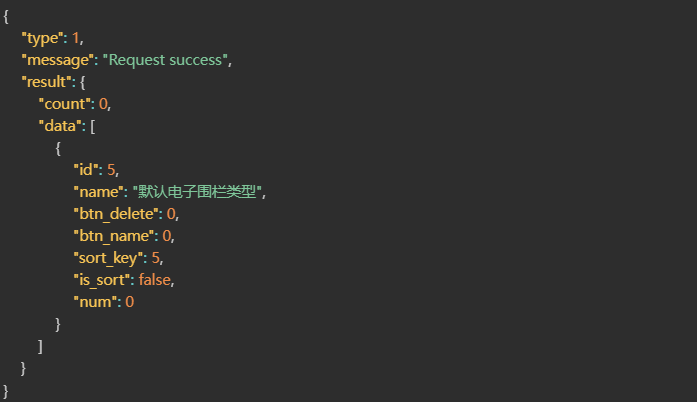
1.POST Address
http://ip:port/EHCommon/area/area/getRealTimeArea
2.Parameter Description
| Field | Required or not | Type | Description |
| id | Number | Area ID | |
| name | String | Area Name | |
| type | Number | Area Type [1: Standard, 7: Signal Fence, 8: Blind Spot, 2: Attendance Zone, 3: Electronic Roll Call Zone] | |
| floor_id_list | Number[] | Floor List | |
| is_use | Number | Area Enabled | |
| is_gps | Number | Is GPS Area? [0: UWB Area, 1: GPS Area] | |
| branch | Number | Department ID | |
| order | String | Sort Order | |
| field | String | Sort Field | |
| page | Number | Page Number | |
| limit | Number | Page Size | |
| scene_id | Number | Scene ID | |
| building_id | Number | Building ID | |
| is_show | Number | Attribute 1 Display [0: Do not display] |
3.Success 200
| Field | Type | Description |
| message | String | Interface Request Message |
| type | Number | Interface Request Status |
| result | Object[] | Area List |
| id | Number | Area ID |
| name | String | Area Name |
| type | Number | Area Type |
| is_use | Number | In Use (Yes/No) |
| floor_id | Number | Floor ID |
| is_gps | Number | GPS Status [0: UWB, 1: GPS] |
| branch_id | Number | Department ID |
| area | String | Actual Area Coordinates |
| is_del | Number | Deleted (Yes/No) |
| is_show | Number | Attribute 1 Display Status [0: Hidden, 1: Visible] |
| floor_name | String | Floor Name |
| building_id | Number | Floor ID |
| building_name | String | Building Name |
| scene_id | Number | Scene ID |
| scene_name | String | Scene Name |
| start | Float | Floor Start Height |
| height | Float | Floor End Height |
| area_style | String | Area Color |
| relative_start | Float | Area Relative Start Height |
| relative_end | Float | Area Relative End Height |
| disappear_time | Number | Disappearance Time |
| count | Number | Tag Count |
| area_group_info | String | Area Grouping Information |
| is_security_area | Number | Safety Zone Status [1: Safety Zone, 0: Not a Safety Zone] |
Correct Return Example
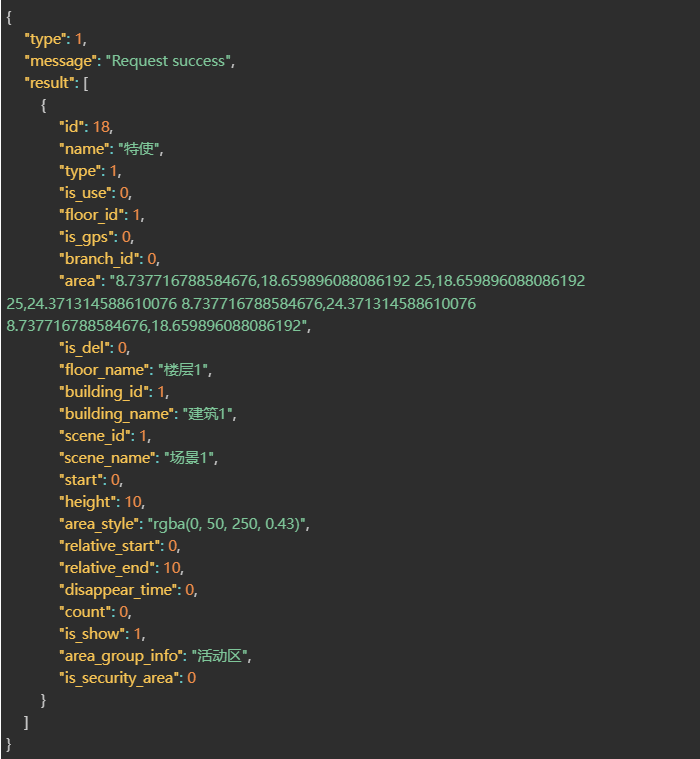
1.POST Address
http://ip:port/EHCommon/area/AreaDict/order
2.Parameter Description
| Field | Required or not | Type | Description |
| order | √ | Object | The sort key corresponding to the dictionary ID. |
3.Success 200
| Field | Type | Description |
| result | String | success |
Correct Return Example

1.POST Address
http://ip:port/EHCommon/area/AreaDict/orderAreaType
2.Parameter Description
| Field | Required or not | Type | Description |
| order | √ | Object | Electronic Fence Type, Location ID, Corresponding Sequence Number (sort_key) |
3.Success 200
| Field | Type | Description |
| result | String | success |
Correct Return Example

1.POST Address
http://ip:port/EHCommon/area/Area/replayArea
2.Parameter Description
3.Success 200
| Field | Type | Description |
| result | Object[] | Request Results |
| id | Number | Region ID |
| name | String | Region Name |
| type | Number | Region Type |
| coords | String | Region Coordinates |
| color | String | Region Color |
| relative_start | Float | Region Relative Start Height |
| relative_end | Float | Region Relative End Height |
| start | Float | Floor Start Height |
| floor_id | Number | Floor ID |
| is_delete | Number | Deletion Status (1: Yes, 0: No) |
| type | Number | API Response Status [0: Login Invalid; 1: Normal Return; 100: Program Exception; 101: Parameter Error; 102: Data Retrieval Failed; 103: Dongle Authentication Failed; 104: Request Header ‘sn’ Missing or Misconfigured; 105: No Reservation Permissions] |
| message | String | API Response Status Message |
Correct Return Example
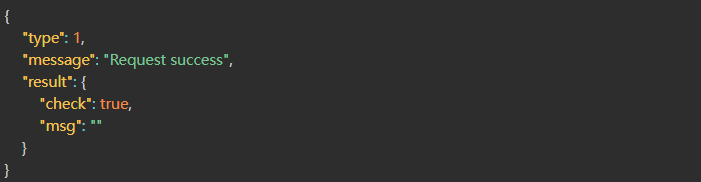
1.POST Address
http://ip:port/EHCommon/area/AreaDict/ruleSettings
2.Parameter Description
| Field | Required or not | Type | Description |
| id | √ | Number | ID |
| options | √ | Object[] | Option Information |
| id | Number | Option Information ID (Leave blank for new entries) | |
| area_type_option_id | √ | String | Region Rule Option ID |
| sort_key | √ | Number | Sort Order |
| name_type | √ | Number[] | Rule Type |
3.Success 200
| Field | Type | Description |
| result | String | result |
Correct Return Example

1.POST Address
http://ip:port/EHCommon/area/area/updateArea
2.Parameter Description
| Field | Required or not | Type | Description |
| id | √ | Number | Area ID |
| name | String | Area Name | |
| type | Number | Area Type [1: Standard, 7: Signal Fence, 8: Blind Spot, 2: Attendance Zone, 3: Electronic Roll Call Zone] | |
| floor_id | Number | Floor ID | |
| is_use | Number | Area Enabled Status | |
| is_show | √ | Number | Visibility Attribute [1: Visible, 0: Hidden] |
| area | String | Area Coordinates: A string concatenating the X/Y coordinates of the points in clockwise order; X and Y values are separated by commas, and points are separated by spaces. The string includes the closing point; format example: “x1,y1 x2,y2 x3,y3 x1,y1” | |
| is_gps | Number | Is GPS Area? [0: UWB Area, 1: GPS Area] | |
| alarm_rule_list | Number[] | List of Alarm Rule IDs | |
| area_group_list | Number[] | List of Area Groups | |
| area_template_id | Number | Area Template ID | |
| area_rule_group_list | Number[] | Rule Group Bound to Area | |
| area_type_option_id | √ | Number | Electronic Fence Area Dictionary: Area Type Option ID |
| area_dict | Object[] | Custom Dictionary Content (Required when creating an area; omit when modifying status) | |
| shape | Number | Area Shape [1: Non-circular, 2: Circular] | |
| circle_attribute | String | Circular Properties (JSON String): {“radius”: 1, “center”: {“x”: 1, “y”: 2}} |
3.Success 200
| Field | Type | Description |
| message | String | Interface Request Message |
| type | Number | Interface Request Status |
| result | String | Modification Result |
Correct Return Example

1.POST Address
http://ip:port/EHCommon/area/AreaDict/updateAreaType
2.Parameter Description
| Field | Required or not | Type | Description |
| id | √ | Number | Electronic Fence Type ID |
| name | √ | String | Electronic Fence Type Name |
3.Success 200
Correct Return Example

1.POST Address
http://ip:port/EHCommon/alarm/Rule/get
2.Parameter Description
| Field | Required or not | Type | Description |
| id | Number | Rule ID | |
| type | Number | Alarm Type | |
| is_danger_all | Number | Hazard Owner |
3.Success 200
| Field | Type | Description |
| message | String | Interface Request Message |
| type | Number | Interface Request Status |
| result | String | Success Message |
Correct Return Example
